Loading
Get How Can I Get The Form W1
How it works
-

Open form follow the instructions
-

Easily sign the form with your finger
-

Send filled & signed form or save
How to fill out the How Can I Get The Form W1 online
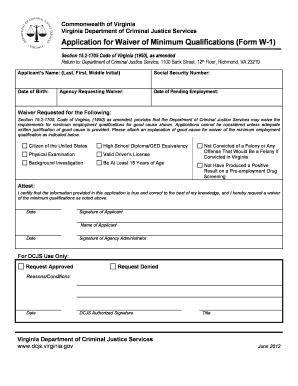
This guide provides clear and supportive instructions on how to fill out the Form W1 online. Whether you are familiar with digital document management or approaching this process for the first time, this guide will help you navigate each step with confidence.
Follow the steps to successfully complete the Form W1 online.
- Press the ‘Get Form’ button to access the form and open it in your preferred editor.
- Begin by entering your name in the designated field, providing your last name, first name, and middle initial. Ensure accuracy in spelling.
- Input your Social Security Number in the allocated section, ensuring confidentiality and correctness.
- Fill in your date of birth in the specified format, paying attention to the order and punctuation.
- Enter the date of the employment you are seeking, which is marked as pending, in the required section.
- Indicate the agency that is requesting the waiver by filling out the relevant field.
- In the 'Waiver Requested for the Following' section, mark or note the qualifications for which you seek a waiver. Ensure you attach a separate document explaining the good cause for this request.
- Attest to the accuracy of the information provided by signing in the signature field. Add the date of the signing as required.
- If applicable, have the agency administrator review and sign the form, adding their name and date next to their signature.
- Finally, review the completed form for accuracy and completeness. Save your changes, and choose to download, print, or share the form as needed.
Complete your documents online with confidence and ease.
You can get a wage and income transcript, containing the Federal tax information your employer reported to the Social Security Administration (SSA), by visiting our Get Transcript page. ... You can also use Form 4506-T, Request for Transcript of Tax Return.