Loading
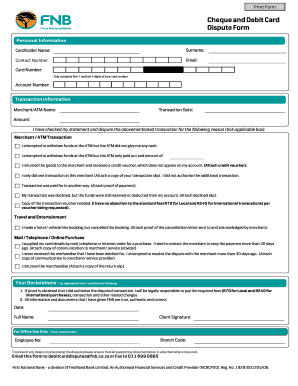
Get Personal Information - Home - First National Bank - Fnb
How it works
-

Open form follow the instructions
-

Easily sign the form with your finger
-

Send filled & signed form or save
How to fill out the Personal Information - Home - First National Bank - FNB online
Filling out your Personal Information form for First National Bank online is a crucial step in managing your banking needs efficiently. This guide provides clear instructions to help you complete the form accurately and with confidence.
Follow the steps to successfully fill out the form online.
- Click ‘Get Form’ button to obtain the form and open it for editing.
- Enter your cardholder name in the designated field, ensuring it matches the name on your identification documents.
- Provide your surname in the specified field.
- Input your contact number in the section provided, ensuring it is accurate for effective communication.
- Indicate your email address clearly in the appropriate space for correspondence regarding your dispute.
- Fill in the card number by entering only the first 7 and last 4 digits of your card to protect sensitive information.
- Complete the account number field as prompted.
- In the transaction information section, enter the merchant/ATM name accordingly.
- Specify the transaction date in the provided format.
- Fill in the amount of the disputed transaction in the relevant field.
- Tick the applicable box under the reason for your dispute to indicate the issue you are experiencing.
- Attach any necessary supporting documents as listed, such as receipts or communication with the merchant.
- Read the declarations carefully. By signing this form, you confirm the accuracy of the information provided.
- Enter the date, full name, and client signature in the final fields.
- Ensure all required documentation is attached to avoid delays in processing your dispute.
- Save changes, download the completed form, or choose to print it out. Finally, submit the form by emailing it to debitcarddisputes@fnb.co.za or faxing it to 011 699 0885.
Take the next step to manage your banking disputes efficiently by completing your form online today.
Visit a First National Bank (FNB) ATM center. Insert your cand and enter your PIN code details. Select Transfers and Payment. Then select Account Details. Then print your Account Details in a slip or. Put in your phone number details to send it via SMS.