Loading
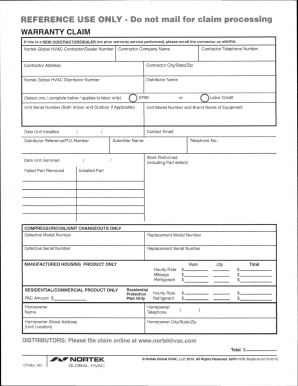
Get Nordyne Warranty Claim Form
How it works
-

Open form follow the instructions
-

Easily sign the form with your finger
-

Send filled & signed form or save
How to fill out the Nordyne Warranty Claim Form online
Filing a warranty claim can seem daunting, but with the Nordyne Warranty Claim Form, you can navigate the process smoothly. This guide provides clear instructions to help you understand and fill out the form accurately.
Follow the steps to successfully complete your warranty claim.
- Click ‘Get Form’ button to obtain the form and open it in the editor.
- Enter your Nortek Global HVAC contractor/dealer number if your service company has been used before for warranty service. If not, ensure you enroll the new contractor on eNORA.
- Input the contractor's telephone number, company name, address, city/state/zip code if you have not entered your contractor number.
- Fill in the distributor number by entering the 8-digit Nortek Global HVAC distributor number.
- Enter the name of the distributor company.
- Indicate whether labor applies by selecting either EPAY or Labor Credit in the appropriate section.
- Provide the unit serial number, including both indoor and outdoor numbers if applicable.
- List the unit model number and brand name of the equipment.
- Enter the date the unit was installed.
- Input your contact email address.
- Specify the date the unit was serviced.
- Describe the work performed, including any failed parts and details of the issue.
- List any removed and installed parts with their respective part numbers.
- If applicable, enter the defective model number and serial number for compressor/unit changeouts.
- Input the replacement model number and serial number for compressor/unit changeouts.
- For manufactured housing products, enter the hourly rate, mileage, and refrigerant used.
- If you are filing for residential/commercial products, input the PAC amount used.
- Fill out the homeowner's name, address, city/state/zip, and telephone number appropriately.
- Review all entries for accuracy and ensure all required sections are completed.
- Save changes, download, print, or share the completed form as needed.
Begin the warranty claim process online by completing your Nordyne Warranty Claim Form today.
Labor coverage ranges in the number of years. The shortest duration of coverage a contractor can purchase is 1 year and many states actually require the contractor to offer at least a year with every . The most common coverage periods available are 1, 2, 3, 5, & 10 years.