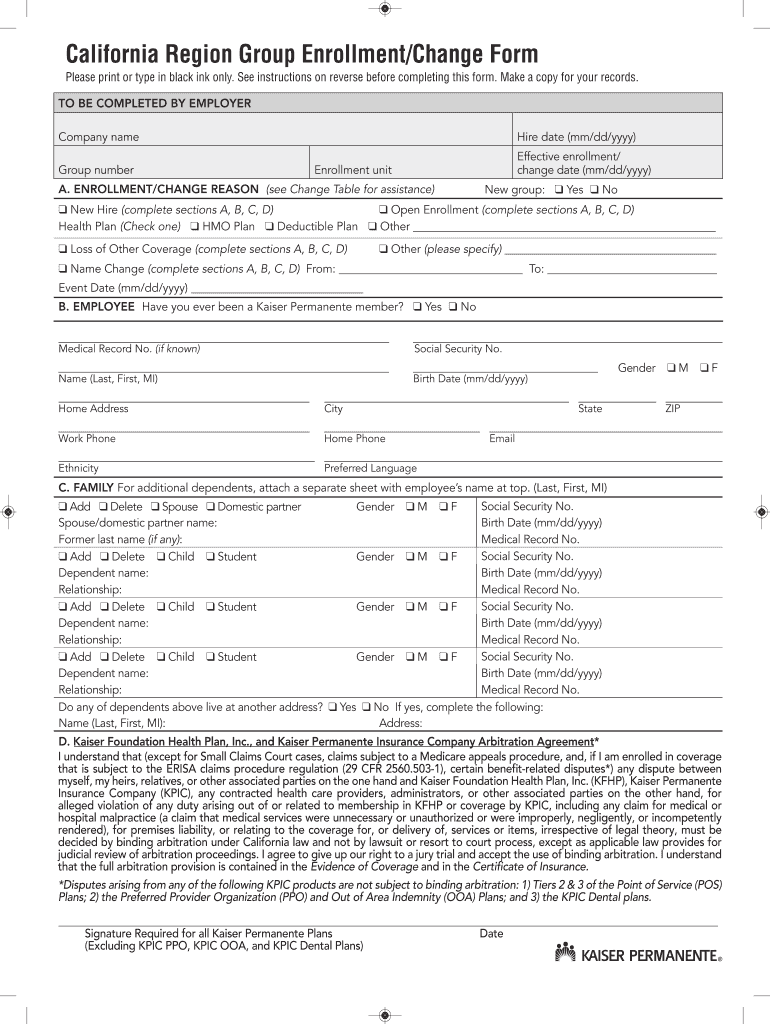
G KPIC PPO, KPIC OOA, and KPIC Dental Plans) Date California Region Group Enrollment/Change Form General instructions 1. Please print firmly and legibly in black ink. Instructions for completing employer and new enrollment sections and sections A through D: 2. To enroll, the subscriber must reside or work within one of the ZIP codes listed on the enclosed sheet. To be completed by employer: The employer must complete all fields to ensure we have correct account and enrollment information. .
Loading

Open form follow the instructions

Easily sign the form with your finger

Send filled & signed form or save
How to fill out the CA Kaiser Permanente Region Group Enrollment/Change Form online
This guide will help you navigate the CA Kaiser Permanente Region Group Enrollment/Change Form online. By following these steps, you will ensure a smooth and accurate submission of your enrollment or change request.
Follow the steps to confidently complete your enrollment/change form.
- Click the ‘Get Form’ button to obtain the CA Kaiser Permanente Region Group Enrollment/Change Form and open it in the document editor.
- Fill out the employer section at the top of the form. This includes providing the company name, group number, hire date, and effective enrollment/change date. Ensure all entries are accurate and complete.
- Proceed to section A to indicate your enrollment/change reason. Options include 'New Hire,' 'Open Enrollment,' 'Loss of Other Coverage,' and 'Name Change.' Select the appropriate reason and provide any required dates.
- In section B, provide your personal details, such as your medical record number, social security number, name, birth date, home address, phone numbers, ethnicity, preferred language, and email. Make sure to double-check for accuracy.
- Move to section C to list any dependents. Indicate whether you are adding or deleting dependents and fill in their details accordingly. If more dependents need to be added, attach a separate sheet with the employee's name at the top.
- In section D, review and understand the arbitration agreement. Acknowledge your understanding by signing and dating this section. This is a crucial step, as it confirms your consent to the terms outlined.
- Once all sections are completed correctly, save your changes, and make a copy of the form for your records. You can also download, print, or share the document as needed.
Complete your CA Kaiser Permanente Region Group Enrollment/Change Form online today for seamless processing.
Experience a faster way to fill out and sign forms on the web. Access the most extensive library of templates available.
Related content
All changes to accounts, including effective dates and child or student status, will be...
California Region Kaiser Permanente Group Enrollment/Change Form. Please print or type in...
Sep 26, 2019 — My name is Joshua Lloyd and I'm a clinical team leader in the Division of...
Get answers to your most pressing questions about US Legal Forms API.
How to fill out Kaiser authorization form?
Filling out the Kaiser authorization form, such as the CA Kaiser Permanente Region Group Enrollment/Change Form, begins with gathering all relevant personal details. Follow the instructions carefully, ensuring all sections are completed accurately. For best practices, consider using templates available through platforms like uslegalforms to guide you.
How to fill out debit authorization form?
To fill out a debit authorization form, you need to provide your bank details clearly. This includes your account number and routing number, alongside your personal information. For assistance, resources like uslegalforms can help ensure you complete the CA Kaiser Permanente Region Group Enrollment/Change Form accurately.
How do I change the region of care on Kaiser?
Changing the region of care on Kaiser requires filling out the CA Kaiser Permanente Region Group Enrollment/Change Form and specifying your new region. Ensure you include all necessary information and submit the form during the appropriate time frames. It’s helpful to contact customer service for any specific requirements related to your situation.
How do I change my Kaiser FEHB enrollment?
To change your Kaiser FEHB enrollment, you must complete the CA Kaiser Permanente Region Group Enrollment/Change Form accurately, indicating your desired changes. Submit the completed form during the designated enrollment period. For assistance, resources like uslegalforms can provide guidance and ensure you don't miss any critical steps.
How to fill out credit authorization form?
Filling out a credit authorization form involves providing your financial information accurately. You'll typically need to include your name, address, and the necessary authorization details. For a smooth process, consult resources like uslegalforms which offer templates and guidance specifically for the CA Kaiser Permanente Region Group Enrollment/Change Form.
Does Kaiser use prior authorization?
Yes, Kaiser does utilize prior authorization for certain services and medications. This process helps ensure that the requested services are necessary and covered under your plan. To streamline your experience, make sure to familiarize yourself with what requires prior authorization and the specific forms needed, like the CA Kaiser Permanente Region Group Enrollment/Change Form.
What is a disadvantage of choosing Kaiser?
One disadvantage of choosing Kaiser is that members may experience limitations in provider selection due to its use of a network of specific healthcare providers. This means you may not have access to outside specialists unless referred within the network. However, many members find that the coordinated care model offers significant benefits in managing their health.
How do I fill out an authorization form?
To fill out the CA Kaiser Permanente Region Group Enrollment/Change Form, begin by gathering your personal details, such as your member ID and contact information. Next, follow the prompts on the form, providing accurate information related to who you are authorizing and the specific services needed. Ensure you review the form thoroughly before submission to avoid any misunderstandings.
How do I change my FEHB enrollment?
To change your FEHB enrollment, you will need to follow the specific instructions provided by your employer and complete the necessary forms. The process typically occurs during the open enrollment period, but you may also qualify for a special enrollment period. For clarity, the CA Kaiser Permanente Region Group Enrollment/Change Form will highlight any requirements and steps for your transition.
What is the enrollment code for Kaiser Permanente FEHB?
The enrollment code for Kaiser Permanente's FEHB plans varies based on the specific plan you select. Check the official Kaiser Permanente website or contact their customer service for the most accurate and current enrollment codes. You can also refer to the CA Kaiser Permanente Region Group Enrollment/Change Form for further assistance.
Use professional pre-built templates to fill in and sign documents online faster. Get access to thousands of forms.
If you believe that this page should be taken down, please follow our DMCA take down process here.