Loading
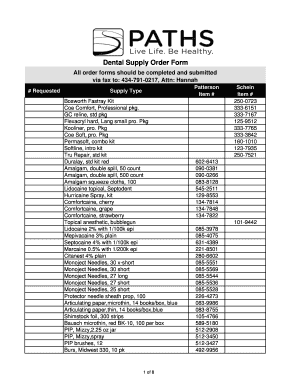
Get Dental Supply Ordering Template
How it works
-

Open form follow the instructions
-

Easily sign the form with your finger
-

Send filled & signed form or save
How to fill out the Dental Supply Ordering Template online
Filling out the Dental Supply Ordering Template online can streamline the ordering process for dental supplies. This guide provides clear, step-by-step instructions to help you complete the form accurately and efficiently.
Follow the steps to successfully fill out the Dental Supply Ordering Template.
- Click the 'Get Form' button to retrieve the Dental Supply Ordering Template and open it in your editing interface.
- Begin by entering the 'Requested' section with items you wish to order. Be specific about the Patterson or Schein items by providing their corresponding item numbers from the list provided.
- Indicate the 'Supply Type' for each requested item. This will help categorize your order accurately.
- Once all items are listed, review your entries to ensure accuracy in item description and quantities.
- After completing the form, you can then save your changes, download, or print the document for submission.
- Submit the completed form via fax to: 434-791-0217, Attn: Hannah, to finalize your order.
Get started on your Dental Supply Ordering Template online now!
Supply order means a written directive or a verbal communication of a written directive, if promptly confirmed in writing, issued by the DOE pursuant to subpart B of this part.