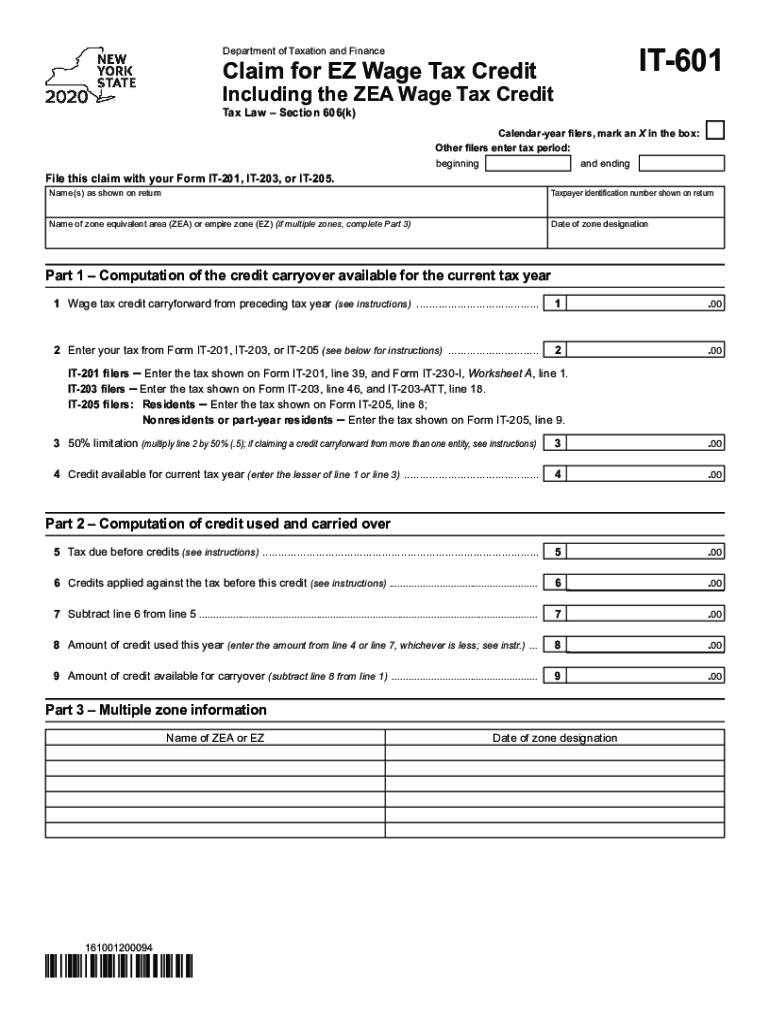
IT601Department of Taxation and FinanceClaim for EZ Wage Tax CreditIncluding the ZEA Wage Tax Credit Tax Law Section 606(k)Calendaryear filers, mark an X in the box: Other filers enter tax period: beginningand.
Loading

Open form follow the instructions

Easily sign the form with your finger

Send filled & signed form or save
How to fill out the NY IT-601 online
The NY IT-601 is a form used to claim the EZ Wage Tax Credit or the ZEA Wage Tax Credit for eligible tax years. This guide provides a clear, step-by-step process for filling out this form online, ensuring users have the necessary information to complete it accurately.
Follow the steps to successfully complete the NY IT-601 online.
- Click the ‘Get Form’ button to obtain the form and open it in the editor.
- Enter your name(s) as shown on your tax return in the designated field, ensuring that it matches the taxpayer identification number shown on your return.
- If you are a calendar-year filer, mark an X in the appropriate box. If you are filing for a different tax period, enter the beginning and ending dates in the provided fields.
- Indicate the name of the zone equivalent area (ZEA) or empire zone (EZ) in the specified section. If you have multiple zones, complete Part 3.
- Provide the date of zone designation in the respective field.
- For Part 1, compute your credit carryover available for the current tax year by entering the wage tax credit carryforward from the preceding tax year in line 1.
- Enter the tax calculated from your corresponding form (IT-201, IT-203, or IT-205) in line 2 as per the instructions provided.
- For line 3, calculate the 50% limitation of your line 2 amount and enter the result. If you are claiming credits from multiple entities, make sure to follow the specific instructions.
- In line 4, indicate the lesser amount between line 1 and line 3 as the credit available for the current year.
- Continue filling out the form by calculating the tax due before credits in line 5 and any credits applied against this tax in line 6, following the provided instructions.
- Calculate the net amount by subtracting line 6 from line 5 and entering that result in line 7.
- Enter the amount of credit used this year in line 8, which is the lesser of either line 4 or line 7.
- Finally, in line 9, determine the amount of credit available for carryover by subtracting line 8 from line 1.
- Once all fields are completed, review your form for accuracy before saving changes. You can choose to download, print, or share the completed form as necessary.
Complete your documents online and ensure timely filing of your tax credits.
Experience a faster way to fill out and sign forms on the web. Access the most extensive library of templates available.
Related content
The New York State Empire Zones Program expired as of July 1,. 2010. A business enterprise...
UR Medicine is a special kind of medicine that you can find at places throughout Western...
The New York City Landmarks Preservation Commission designated 601 Lexington Avenue as a...
Use professional pre-built templates to fill in and sign documents online faster. Get access to thousands of forms.
If you believe that this page should be taken down, please follow our DMCA take down process here.
This form is available in several versions. Select the version you need from the drop-down list below.