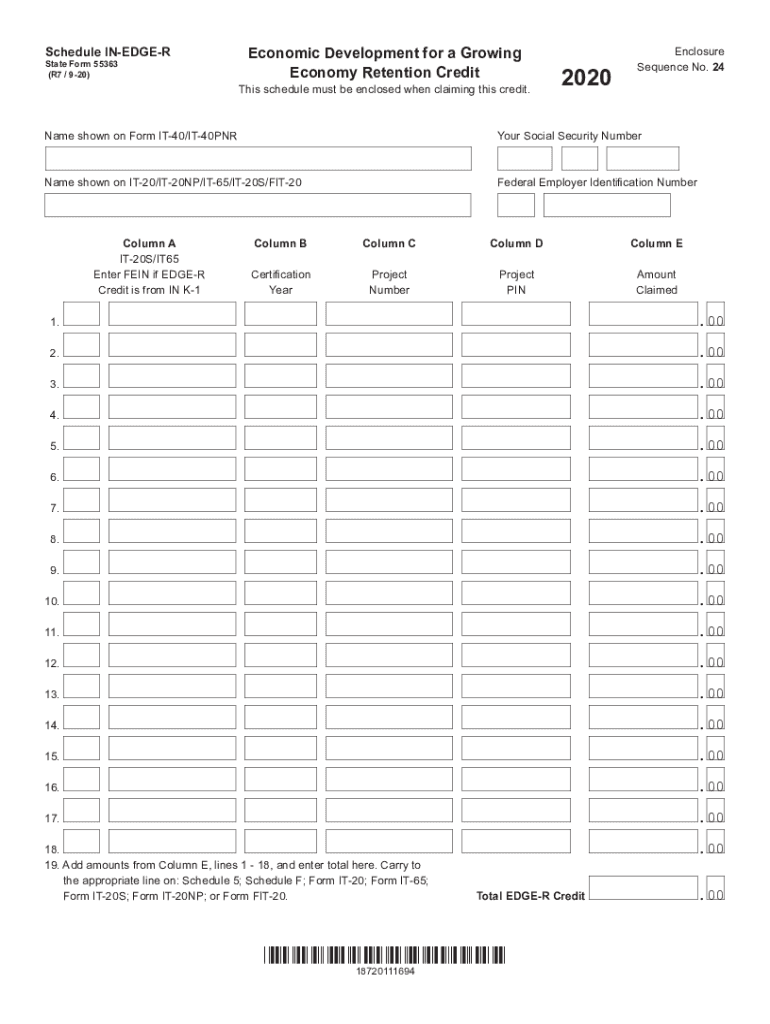
Schedule INEDGER State Form 55363 (R7 / 920)Economic Development for a Growing Economy Retention CreditThis schedule must be enclosed when claiming this credit.2020Enclosure Sequence No. 24Name shown.
Loading

Open form follow the instructions

Easily sign the form with your finger

Send filled & signed form or save
How to fill out the IN Schedule IN-EDGE-R online
The IN Schedule IN-EDGE-R is a vital form for claiming the Economic Development for a Growing Economy Retention Credit. Completing this form accurately is essential for ensuring that your credit is recognized and processed correctly. This guide provides step-by-step instructions to assist you in filling out this form online, making the process straightforward and efficient.
Follow the steps to successfully complete the IN Schedule IN-EDGE-R.
- Press the ‘Get Form’ button to access the IN Schedule IN-EDGE-R and open it in your editor.
- Enter the name of the individual, corporation, or nonprofit organization claiming the credit in the designated field.
- Input your Social Security number or federal employer identification number in the next field.
- In Column A, if applicable, provide the federal employer identification number of the S corporation or partnership from which you are claiming the EDGE-R credit.
- In Column B, enter the tax year for which the credit has been certified. This information can be found in the certification letter you received from the Indiana Economic Development Corporation (IEDC) or on your IN K-1.
- In Column C, input the project number you received from the IEDC, which is available in the certification letter or on your IN K-1.
- In Column D, include the project PIN you received from the IEDC. If you are claiming a credit for a year before 2014 and do not have a PIN, leave this column blank.
- In Column E, enter the amount of credit you are claiming.
- For Line 19, add the amounts listed in Column E, lines 1-18, and record the total. This total EDGE-R credit will need to be transferred to the appropriate line on Schedule 5, Schedule F, Form IT-20, Form IT-65, Form IT-20S, Form IT-20NP, or Form FIT-20.
- Once you have filled out the form, you can save your changes, download, print, or share the completed document as needed.
Complete your documents online to ensure accurate and timely processing.
Experience a faster way to fill out and sign forms on the web. Access the most extensive library of templates available.
Related content
Total EDGE-R Credit .00. Enclosure. Sequence No. 24. Schedule IN-EDGE-R. State Form 55363...
by T He · Cited by 105 — It's Hard to Share: Joint Service Placement and. Request...
Owner/Operator Manual. Manuel Du Propriétaire/Utilisateur. Model. 986101 – Edger...
Use professional pre-built templates to fill in and sign documents online faster. Get access to thousands of forms.
If you believe that this page should be taken down, please follow our DMCA take down process here.
This form is available in several versions. Select the version you need from the drop-down list below.