Loading
Get Id Dc-2480 2019-2026
How it works
-

Open form follow the instructions
-

Easily sign the form with your finger
-

Send filled & signed form or save
How to fill out the ID DC-2480 online
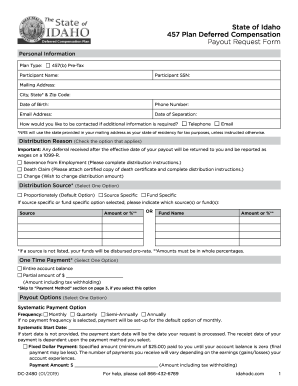
Filling out the ID DC-2480 form online is an essential step for individuals wishing to request a payout from their 457 Plan Deferred Compensation. This guide will walk you through the process step-by-step, ensuring that you complete each section accurately and efficiently.
Follow the steps to fill out the ID DC-2480 online.
- Click the ‘Get Form’ button to obtain the form and open it in the online editor.
- In the 'Personal Information' section, enter your participant name, Social Security number, mailing address, city, state, zip code, date of birth, phone number, email address, and date of separation. Ensure all information is accurate and current.
- Choose your preferred method of contact by selecting either 'Telephone' or 'Email' for any necessary follow-up.
- Indicate your reason for distribution by checking one of the options: 'Severance from Employment', 'Death Claim', or 'Change'. Make sure to provide any additional information required for your chosen option.
- Select a distribution source by choosing 'Proportionately', 'Source Specific', or 'Fund Specific'. If applicable, indicate which source or fund you wish to specify.
- If electing a 'One Time Payment', choose either 'Entire account balance' or specify a 'Partial amount' by entering the desired amount, considering tax withholding if applicable.
- For payout options, select how you want your payments to be structured: 'Systematic Payment Option' or 'Purchased Annuities'. Fill in the necessary details like frequency and payment amounts as instructed.
- Complete the 'Payment Method' section by choosing how you would like to receive your funds. Options may include ACH, check, or other specified methods.
- Fill out the 'Tax Withholding' section per your preferences, indicating whether you would like additional federal tax withheld or to not withhold federal tax.
- Review the certification and authorization statements, verifying your information and agreeing to the terms provided in the form.
- Finally, sign and date the form where indicated and prepare to submit it. You may either mail the form to the provided address or send it by fax.
- Once you have submitted the form, you can save changes, download a copy, print it for your records, or share it with relevant parties as needed.
Begin completing your ID DC-2480 form online today to manage your deferred compensation effectively.