Loading
Get Or Dmv 735-500 2013-2026
How it works
-

Open form follow the instructions
-

Easily sign the form with your finger
-

Send filled & signed form or save
How to use or fill out the OR DMV 735-500 online
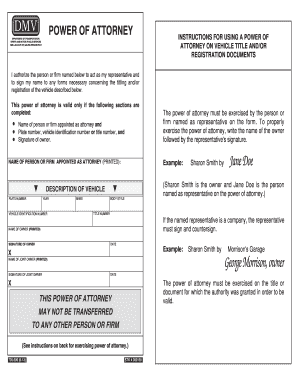
The OR DMV 735-500 form is a Power of Attorney document that allows a designated individual or firm to act on your behalf regarding the titling and registration of a vehicle. This guide will provide you with clear, step-by-step instructions on completing the form online, ensuring the process is simple and efficient.
Follow the steps to correctly fill out the OR DMV 735-500 online.
- Click ‘Get Form’ button to obtain the form and open it in the editor.
- In the first section, input the name of the individual or firm you are appointing as your attorney in a printed format. Make sure their name is clear and legible.
- Next, provide the vehicle’s plate number. This number is typically displayed on the vehicle's license plate.
- Then, enter the vehicle identification number (VIN). This is a unique code assigned to your vehicle for identification purposes.
- In this section, you should also include the year, make, and body style of the vehicle. Be specific to ensure accuracy.
- If your appointed representative is a firm, they must both sign and countersign the document in the designated areas.
- Complete the date section by entering the date when the Power of Attorney is being executed.
- Finally, ensure that both the owner's printed name and signature are included, confirming their authorization.
- Once all sections are completed, you can save changes, download the document, print a copy, or share the form as needed.
Complete your OR DMV 735-500 form online today for a hassle-free experience.
Does a Power of Attorney in Oregon Need to Be Notarized? No, OR Powers of Attorney don't require a notary public to oversee the signing of the document by the Principal and Agent. Instead, 2 witnesses must also be present when the document is signed in order to legally validate it.