27475 Ynez Road #322 Temecula, CA 92591 Phone: (951) 6763850 Fax: (951) 6763840 Email: info eliteclaims.comElite Claims ManagementWorkers Compensation Specialists www.eliteclaims.comEmployees Incident.
Loading

Open form follow the instructions

Easily sign the form with your finger

Send filled & signed form or save
How to fill out the Elite Claims Management Employee’s Incident Report online
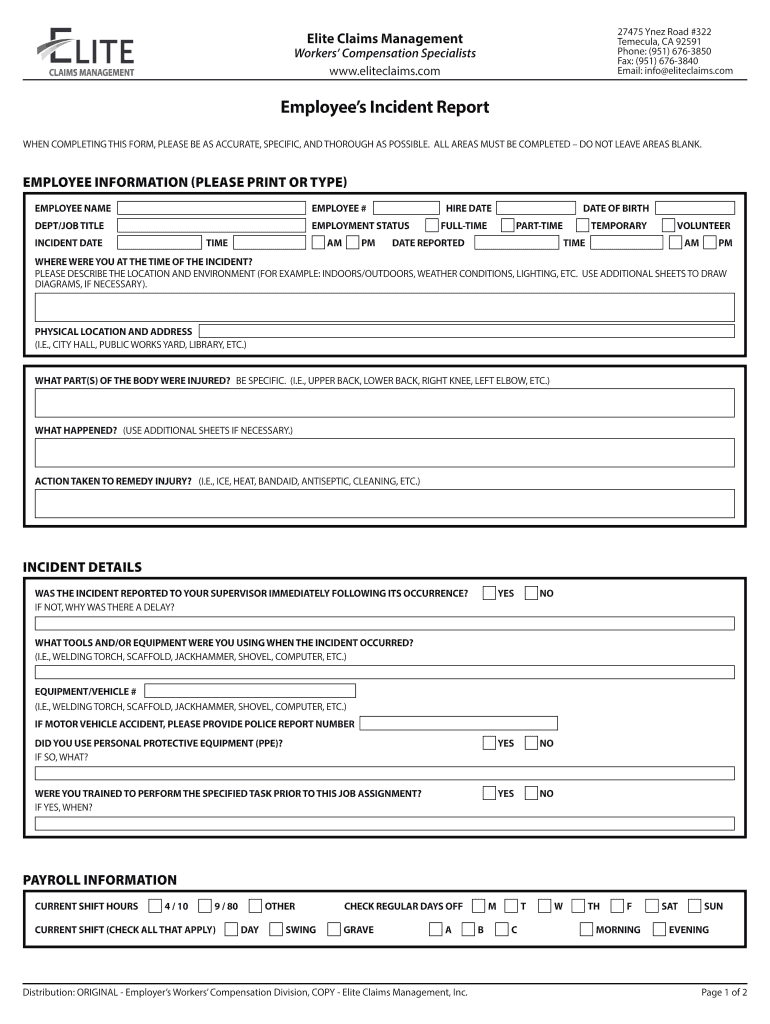
The Elite Claims Management Employee’s Incident Report is a crucial document designed to capture all necessary details about an incident that may affect your wellbeing at work. This guide provides clear, step-by-step instructions to help you accurately complete the form online.
Follow the steps to successfully complete your incident report.
- Click ‘Get Form’ button to access the incident report and open it in your online editor.
- Complete the employee information section by providing your name, employee number, department or job title, hire date, and employment status. Make sure all entries are accurate to avoid any delays in processing.
- Record the date and time of the incident, including whether it was in the AM or PM. Enter your date of birth for identification purposes.
- Describe the location and environment of the incident. Be specific about whether the setting was indoors or outdoors and detail any weather conditions or lighting issues.
- Identify the body part(s) that were injured and provide a detailed description of what occurred. Use additional sheets if necessary to explain the events clearly.
- Indicate any actions taken to remedy the injury, such as applying ice, heat, or other first aid measures.
- Answer whether you reported the incident to your supervisor immediately afterwards, and if not, provide an explanation for the delay.
- Indicate whether personal protective equipment (PPE) was used during the incident and specify what type.
- Indicate if you had received training for the task you were performing and when that training took place.
- Detail any tools or equipment you were using at the time of the incident, including any relevant identification numbers for vehicles or equipment.
- Complete the payroll information section, checking all applicable shift hours and other relevant details about your work schedule.
- In the medical information section, specify whether you have seen a doctor for the injury, and if applicable, describe any work restrictions that were prescribed. Include the name of the physician or hospital if relevant.
- State if you missed time from work due to the injury, noting the last date worked and when you returned.
- If there were other people present during the incident, provide their names and describe their involvement. Also, confirm if other employees were injured.
- Include any additional remarks or recommendations for preventing similar incidents in the future.
- Finally, ensure all necessary signatures are obtained from both you and your supervisor, and check that your form is complete before saving, downloading, printing, or sharing as needed.
Complete your incident report online today to ensure your safety and compliance with workplace policies.
Experience a faster way to fill out and sign forms on the web. Access the most extensive library of templates available.
Related content
compensation insurance through proper claims management, Stay at Work/Return to Work...
MANSFIELD UNIVERSITY OF PA/SSHE/INSERVCO. It is your responsibility to immediately report...
20 Aug 2019 — The four sub-teams are the Employees Team, the Environment Team, the...
Get answers to your most pressing questions about US Legal Forms API.
Can I sue my employer for a workplace injury Canada?
You cannot sue your employer, another employer or a worker (whether or not you have the same employer) for causing your work-related injury or occupational disease. Section 127 of the Workers Compensation Act bans such lawsuits.
What are the types of injuries on duty?
The types of injuries of duties (IOD) range from minor contusions to amputations of digits. Other injuries include removal of foreign bodies in the eyes and in the skin as a result of, for example, grinding metal. Burns, abrasions and lacerations are all in a days work.
How long do you have to file a WCB claim in Nova Scotia?
Report the injury to WCB Nova Scotia within 5 business days if the worker sought medical aid or lost time from work. Using MyAccount to submit a report is the fastest way.
What should a worker do if injured at work Ontario?
Report an injury or illness Get medical help. Get first aid right away. ... Document. Tell your employer about any medical treatment you received as soon as possible and let them know about any additional information you received about your injury or illness. ... Report to the WSIB. Report your injury or illness if: ... Work together.
What happens if you get injured at work Canada?
Through the Government Employees Compensation Act (GECA), the Government of Canada may provides workers' compensation benefits to federal employees who are injured or become ill as a result of their work.
Can I sue my employer for workplace injury Ontario?
If you are in Ontario and the Workplace Safety and Insurance Act covers you, the Workplace Safety and Insurance Board (WSIB) is your only recourse for workplace injury compensation. You cannot sue your employer for anything to do with your injury.
What should you do if you get injured at work Ontario?
Report your injury or illness to the WSIB –You must complete a Worker's Report of Injury/Disease (Form 6). You can complete and submit it using our website. You must file your claim within six months of the date of your injury or six months after being diagnosed with a work-related illness.
Use professional pre-built templates to fill in and sign documents online faster. Get access to thousands of forms.
If you believe that this page should be taken down, please follow our DMCA take down process here.