Loading
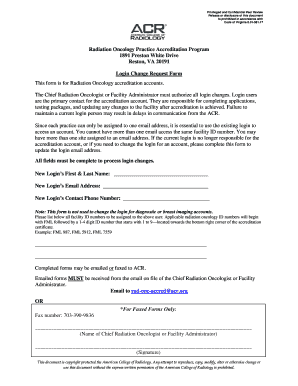
Get Acr Ropa Login Change Request Form
How it works
-

Open form follow the instructions
-

Easily sign the form with your finger
-

Send filled & signed form or save
How to fill out the ACR ROPA Login Change Request Form online
The ACR ROPA Login Change Request Form is essential for updating login information related to Radiation Oncology accreditation accounts. This guide provides clear steps to assist you in filling out the form accurately and efficiently.
Follow the steps to complete the form online.
- Press the ‘Get Form’ button to access the form and open it in the editor.
- Enter the new login's first and last name in the designated field. Ensure you provide the full names as they appear in official documents.
- Input the new login's email address in the corresponding section. It is crucial to use an email address that is currently not associated with your facility ID.
- Fill in the contact phone number for the new login. Provide a direct number for efficient communication.
- List all applicable facility ID numbers that need to be assigned to the new login. Remember, these should begin with 'FML' followed by a 1-4 digit ID, ensuring they are still valid and in use.
- Obtain the signature of the Chief Radiation Oncologist or Facility Administrator in the provided section of the form, signifying their approval of this request.
- Once all fields are filled out and the form is complete, you can proceed to submit the form by either emailing it to rad-onc-accred@acr.org or faxing it to 703-390-9836. Remember, emailed forms must come from the email address on file.
Complete your ACR ROPA Login Change Request Form online today.
Paisabazaar has launched Credit plus or credit advisory services for customers checking and downloading their free credit report from our platform. The service is aimed to provide assistance to customers who are either New To Credit (NTC) or have low credit score.