Loading
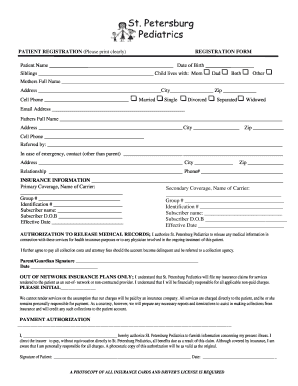
Get St. Petersburg Pediatrics Registration Form
How it works
-

Open form follow the instructions
-

Easily sign the form with your finger
-

Send filled & signed form or save
How to fill out the St. Petersburg Pediatrics Registration Form online
Filling out the St. Petersburg Pediatrics Registration Form online can streamline the registration process for your child’s healthcare. This guide provides detailed, step-by-step instructions to help you navigate through each section of the form effectively.
Follow the steps to complete your registration successfully.
- Click ‘Get Form’ button to obtain the form and open it for completion.
- Start by filling out the patient’s name and date of birth in the designated fields. Ensure that all information is accurate to avoid any discrepancies.
- In the sibling's section, list the names of any siblings if applicable. Indicate the primary guardian the child lives with by selecting options such as mom, dad, both, or other.
- Next, provide the full name, address, and city of the primary guardian (mother or father) along with their cell phone number. Be sure to verify the accuracy of this information.
- Indicate the relationship status of the primary guardian by selecting from options like married, single, divorced, separated, or widowed.
- Fill in the email address for future communication regarding the patient’s care.
- Complete the fields for the second parent or guardian in the same manner, including their full name, address, city, zip code, and cell phone number.
- Provide the name of the referring individual or organization if applicable.
- In case of an emergency, list a contact other than a parent, including their name, address, relationship to the patient, and phone number.
- Fill in the insurance information, including primary and secondary coverage details. This requires the name of the insurance carrier(s), group number(s), and identification number(s).
- For the subscriber fields, provide the name and date of birth of the policy holder(s) along with the effective date of coverage.
- Carefully read and provide a signature for the authorization to release medical records. This is a crucial section for ensuring communication with health insurance and treatment providers.
- If applicable, indicate your understanding of out-of-network insurance plans and initial where requested, acknowledging the responsibility for payment.
- Complete the payment authorization section with your signature and date, affirming your understanding of financial responsibilities regarding charges for the services provided.
- Finally, ensure that you attach a photocopy of all insurance cards and the driver's license as required and review all entered information for accuracy.
- Once all information is filled out, save your changes, download, print, or share the completed form as needed.
Complete the St. Petersburg Pediatrics Registration Form online today to ensure prompt registration for your child's care.