Loading
Get Nd F-66(nd-3a) 2017-2026
How it works
-

Open form follow the instructions
-

Easily sign the form with your finger
-

Send filled & signed form or save
How to fill out the ND F-66(ND-3A) online
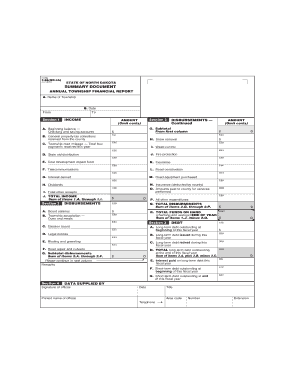
This guide provides a step-by-step approach to effectively complete the ND F-66(ND-3A) online. Whether you are new to this process or seeking a refresher, these instructions will help ensure that you accurately report your township's financial information.
Follow the steps to fill out the ND F-66(ND-3A) form online.
- Click ‘Get Form’ button to access the form and open it in your browser.
- Fill in Section 1, starting with 'A. Name of Township.' Enter the township's official name in the designated field. Then, proceed to 'B. Date' and indicate the date of the report.
- Record your income details in Section 1. For 'A. Beginning balance,' input the total amount in your checking and saving accounts. Next, for 'B. General property tax collections,' list the total received from the county in the appropriate field.
- Continuing in Section 1, complete 'C. Township road mileage' by entering the total payments received this year related to township road mileage. Move on to 'D. State aid distribution' and 'E. Coal development impact fund' under income, providing the necessary amounts for each.
- In Section 2, begin entering the disbursements. Start with 'O. Amounts paid to county for services performed' and then follow through with 'P. All other expenditures.' Ensure that each entry is accurately reflected in the form.
- Summarize disbursements by calculating subtotal amounts where required, specifically in 'G. Subtotal' of Section 2, and verify totals in 'Q. TOTAL DISBURSEMENTS' that reflect all expenditures.
- Proceed to Section 3, titled 'Debt.' Record any long-term debt issued or retired during the fiscal year. Ensure to also provide the total outstanding long-term debt at the end of the year in 'D. TOTAL long-term debt outstanding.'
- In the final section, ensure that you sign as the official in the 'DATA SUPPLIED BY' section and fill out your printed name, title, area code, and telephone number.
- Once all sections are complete and checked for accuracy, you can choose to save changes, download, or print the form for your records.
Complete your ND F-66(ND-3A) form online today to ensure your township's finances are accurately reported.