Loading
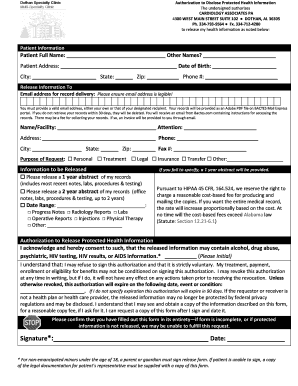
Get Dothan Specialty Clinic Authorization To Disclose Protected Health Information
How it works
-

Open form follow the instructions
-

Easily sign the form with your finger
-

Send filled & signed form or save
How to fill out the Dothan Specialty Clinic Authorization To Disclose Protected Health Information online
Completing the Dothan Specialty Clinic Authorization To Disclose Protected Health Information is an essential step for users wishing to share their medical records safely and efficiently. This guide provides clear instructions for filling out the form online, ensuring that you understand each component and can complete it with ease.
Follow the steps to successfully complete the authorization form online.
- Press the ‘Get Form’ button to obtain the document and open it in your editing interface.
- Fill in the patient information section. This includes the patient’s full name, any other names used, address, date of birth, city, state, zip code, and phone number. Ensure the information is accurate to avoid processing delays.
- Specify the email address for record delivery. Make sure the address is clear and legible, as records will be sent digitally through a secure portal. You may use your email or that of an appointed recipient.
- Provide the name and address of the organization or person you wish to release your health information to. Include any attention details and a phone number if applicable.
- Indicate the purpose of the request by checking the appropriate box. Options include personal, treatment, legal, insurance, transfer, or other.
- Specify the information to be released. You may request a one-year or two-year abstract of your records or specify a date range and types of records needed, such as progress notes or lab results.
- Read and acknowledge the authorization to release protected health information section. Initial where indicated to confirm you understand the types of information that may be released.
- Sign and date the form in the designated area. For individuals under the age of 18, a parent or guardian must sign. If applicable, include legal documentation for any representatives.
- Once completed, review the entire form for accuracy. Ensure all required fields are filled out before submission.
- Finally, save your changes, and you may download, print, or share the completed form as needed.
Complete your authorization form online today to ensure your health information is shared seamlessly.
Industry-leading security and compliance
US Legal Forms protects your data by complying with industry-specific security standards.
-
In businnes since 199725+ years providing professional legal documents.
-
Accredited businessGuarantees that a business meets BBB accreditation standards in the US and Canada.
-
Secured by BraintreeValidated Level 1 PCI DSS compliant payment gateway that accepts most major credit and debit card brands from across the globe.