Loading
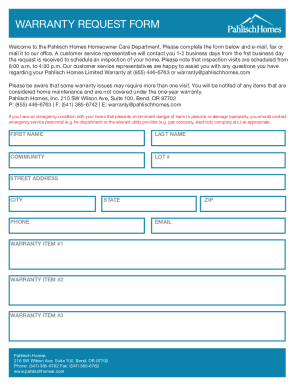
Get Warranty Request Form - Pahlisch Homes
How it works
-

Open form follow the instructions
-

Easily sign the form with your finger
-

Send filled & signed form or save
How to use or fill out the WARRANTY REQUEST FORM - Pahlisch Homes online
Filing a warranty request is an essential process for homeowners seeking assistance from Pahlisch Homes. This guide will provide clear, step-by-step instructions on how to effectively complete the Warranty Request Form online, ensuring that your request is processed smoothly and efficiently.
Follow the steps to complete the warranty request form accurately.
- Press the ‘Get Form’ button to obtain the Warranty Request Form and open it in your selected editor.
- Begin by filling in your first and last name in the designated fields to identify yourself as the homeowner.
- Enter your community and lot number, followed by your street address, city, state, and zip code. This information helps verify the property associated with the warranty request.
- Provide your contact phone number and email address. Ensure that these are accurate so that Pahlisch Homes can reach you regarding your warranty inspection.
- Detail the specific warranty items requiring attention by entering them into the fields labeled Warranty Item #1, Warranty Item #2, and Warranty Item #3. Be as descriptive as possible to facilitate understanding of your request.
- Once all fields are filled out, review the information to ensure accuracy. After confirming correctness, you can choose to save, download, print, or share the completed form as needed.
Take the next step to secure your home's warranty coverage by completing the Warranty Request Form online today.