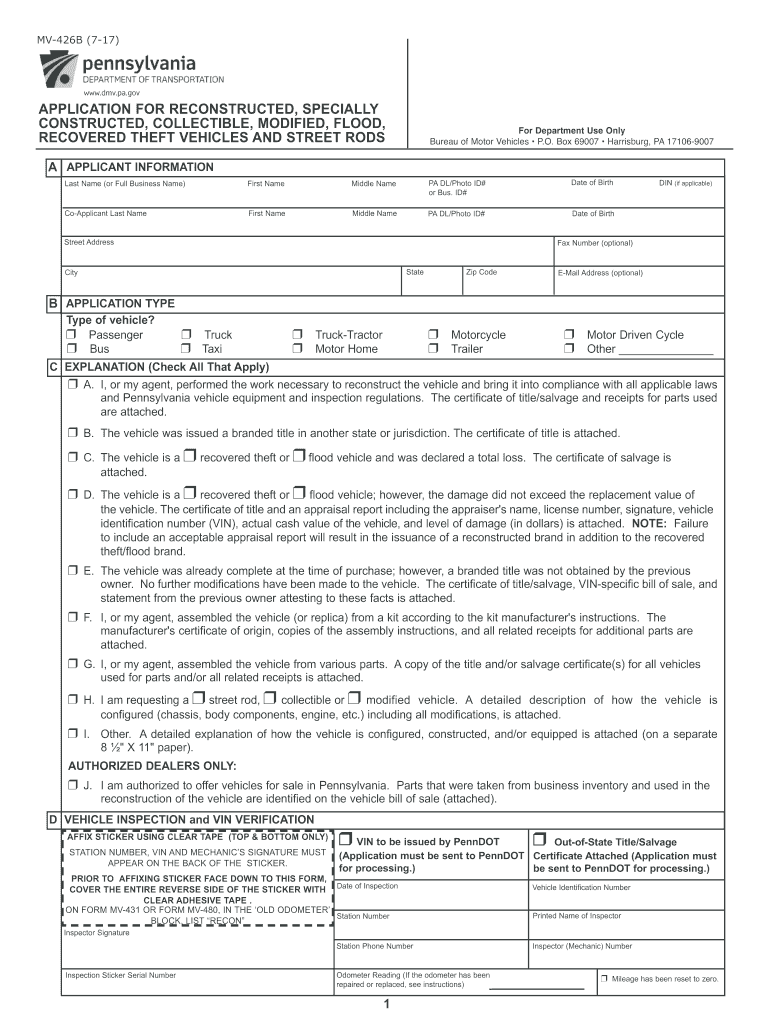
D in the reconstruction of the vehicle are identified on the vehicle bill of sale (attached). D VEHICLE INSPECTION and VIN VERIFICATION AFFIX STICKER USING CLEAR TAPE (TOP & BOTTOM ONLY) STATION NUMBER, VIN AND MECHANIC’S SIGNATURE MUST APPEAR ON THE BACK OF THE STICKER. r VIN to be issued by PennDOT r Out-of-State Title/Salvage (Application must be sent to PennDOT Certificate Attached (Application must for processing.) be sent to PennDOT for processing.) PRIOR TO AFFIXING STICKER FACE DOW.
Loading

Open form follow the instructions

Easily sign the form with your finger

Send filled & signed form or save
How to fill out the PA MV-426B online
Filling out the PA MV-426B form online is crucial for titling vehicles that have been reconstructed, specially constructed, or modified in Pennsylvania. This guide provides a clear and comprehensive overview of each section of the form to ensure a smooth application process.
Follow the steps to complete the PA MV-426B online efficiently.
- Click ‘Get Form’ button to access the PA MV-426B form and open it in your online editor.
- Begin by entering your applicant information accurately. Include the last name, first name, and any middle names as they should appear on the title. Make sure to input your PA driver’s license or photo ID number.
- Complete the co-applicant section if applicable. Enter the co-applicant's last name, first name, and PA ID number, following the same guidelines as the primary applicant.
- Indicate the type of vehicle you are applying for by checking the appropriate boxes (e.g., passenger, truck, motorcycle, etc.). It is essential to be precise as this affects the processing of your application.
- In Section C, check all applicable explanations regarding the vehicle's condition or type of reconstruction. Ensure that you have attached any necessary supporting documents, such as receipts or titles.
- For the vehicle inspection section, you will need a certified inspector to verify the VIN and other vehicle details. Ensure the inspector fills out this section accurately, including signature and station number.
- If applicable, complete the weight certification section for trucks or trailers. Attach the weight slip if the unladen weight is not listed on the title or salvage certificate.
- Proceed to document any components you have replaced or repaired. Check the appropriate boxes and attach receipts or documentation as required.
- Calculate the total fees due based on the fees outlined in the form, ensuring that you include sales tax, title fees, and any applicable registration fees.
- Ensure all required signatures are present on the form. This includes the applicant, co-applicant, enhanced vehicle safety inspector, and certified document reviewer.
- Review the completed form and all attached documentation for accuracy before saving changes. When satisfied, you can choose to download, print, or share the completed form as necessary.
Complete your PA MV-426B form online today to ensure a hassle-free vehicle title application process.
Experience a faster way to fill out and sign forms on the web. Access the most extensive library of templates available.
Related content
Vehicles coming to Pennsylvania on a branded out-of-state title are permitted to obtain a...
This work develops a project methodology in order to identify high stress zones on a light...
Form. MV-426B must be completed for vehicles not originally equipped as a motor home and...
Get answers to your most pressing questions about US Legal Forms API.
How do I clear a salvage title in PA?
To clear a salvage title in Pennsylvania, you must complete substantial repairs and pass an inspection at an official garage. After passing, gather all documentation and submit the proper forms, including the PA MV-426B, to your local DMV. Following these steps will lead you towards successfully obtaining a rebuilt title for your vehicle.
Can a salvage title be cleared in NY?
Yes, a salvage title can be cleared in New York through a re-inspection process after repairs. Once the vehicle meets the state’s safety standards, you can obtain a rebuilt title. Utilize the guidelines for the PA MV-426B to ensure all paperwork is correct while navigating this process seamlessly.
Should I worry about a salvage title?
While a salvage title indicates a vehicle has been significantly damaged, it doesn’t necessarily mean it is unsafe. Buyers should conduct thorough research and inspections to verify the vehicle's condition. If you are unsure about handling the details, using resources like the PA MV-426B can provide clarity on the next steps in addressing any concerns.
What will fail a salvage inspection?
Factors that may fail a salvage inspection include significant structural damage, failing safety features, or missing essential components like airbags. Incomplete paperwork or inconsistencies with the PA MV-426B form can also lead to a failed inspection. To improve your chances, ensure that all repairs meet state regulations and that your forms are correctly filled out.
How to pass a salvage title inspection?
Passing a salvage title inspection involves ensuring that your vehicle meets the safety and structural standards set by your state's DMV. Conduct any necessary repairs and gather all documentation related to previous damages. If you present evidence of these modifications, you'll enhance your chances of a successful inspection and can proceed with completing forms like the PA MV-426B.
How to fill out MVR form?
To fill out the MVR form, known as the PA MV-426B, you need to gather your vehicle information, including the VIN, title number, and any personal details required. Carefully enter your data in the designated sections of the form, making sure to double-check for accuracy. You can easily access a fillable version of this form through the US Legal Forms platform, ensuring a straightforward process.
How to clear a salvage title in PA?
To clear a salvage title in Pennsylvania, start by thoroughly repairing the vehicle to ensure it meets safety standards. Schedule an inspection with a certified mechanic who can verify the repairs. After passing the inspection, you will need to apply for a clean title using the PA MV-426B form. Following these steps can help you transition from salvage to clean title successfully.
Can you drive a car with a salvage title in Pennsylvania?
You cannot legally drive a car with a salvage title in Pennsylvania until it is properly repaired and inspected. To regain driving privileges, repairs must meet safety standards set by the state. Once your vehicle passes inspection, you can file for a clean title using the PA MV-426B form. Ensure you follow all legal requirements to avoid complications on the road.
Does a PA salvage title need to be notarized?
In Pennsylvania, a salvage title does not typically need to be notarized prior to applying for a clean title. However, certain documents, such as the PA MV-426B form or bills of sale, may require notarization depending on the situation. Always check the latest state requirements to ensure you have the necessary documentation. This diligence can save time and ensure compliance during the title transfer process.
Can a salvage title be cleared in PA?
Yes, a salvage title can be cleared in Pennsylvania. The process involves repairing the vehicle, passing a state inspection, and submitting the PA MV-426B form. Once approved, you can receive a clean title. This process not only restores the vehicle’s value but also allows your car to be legally driven on the road.
Use professional pre-built templates to fill in and sign documents online faster. Get access to thousands of forms.
If you believe that this page should be taken down, please follow our DMCA take down process here.
This form is available in several versions. Select the version you need from the drop-down list below.