Loading
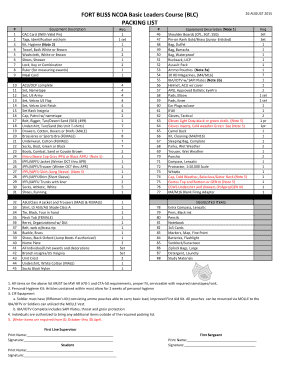
Get Fort Stewart Blc Packing List
How it works
-

Open form follow the instructions
-

Easily sign the form with your finger
-

Send filled & signed form or save
How to fill out the Fort Stewart Blc Packing List online
The Fort Stewart Blc Packing List is essential for ensuring that all participants are well-prepared for the Basic Leaders Course. This guide provides clear, step-by-step instructions on how to complete the packing list online, catering to users of all experience levels.
Follow the steps to complete the packing list online
- Click ‘Get Form’ button to access the packing list and open it for editing.
- Begin filling out your personal information at the top of the form, including your name and identification details.
- Review each item on the packing list carefully. Ensure you check each equipment description against your available gear.
- Specify the quantity required for each item where applicable. Follow the guidelines provided next to each piece of equipment.
- If you have any additional items you wish to bring, note them in the designated area, adhering to the stated guidelines and allowances.
- Once all items are accounted for and numbers filled in, make sure to double-check your entries for any errors or omissions.
- Save your changes. Depending on your needs, you can choose to download, print, or share the completed packing list.
Start completing your Fort Stewart Blc Packing List online now!
Get form
Experience a faster way to fill out and sign forms on the web. Access the most extensive library of templates available.
Soldiers dismissed from BLC for academic deficiency may apply to reenter and be re-scheduled for the course when both the unit commander and the learner or Soldier determine that they are prepared to complete the course. reasons beyond the student's control.
Get This Form Now!
Use professional pre-built templates to fill in and sign documents online faster. Get access to thousands of forms.