We use cookies to improve security, personalize the user experience, enhance our marketing activities (including cooperating with our marketing partners) and for other business use.
Click "here" to read our Cookie Policy. By clicking "Accept" you agree to the use of cookies. Read less
Read more
Accept
Loading
Form preview
  • US Legal Forms
  • Form Library
  • More Forms
  • More Multi-State Forms
  • Climatemaster Wiring Diagram

Get Climatemaster Wiring Diagram

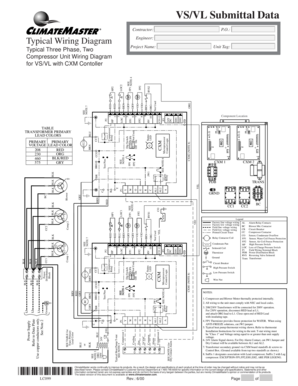
Clear Form VS/VL Submittal Data Print Form Contractor: Engineer: Typical Wiring Diagram Project Name: ORG EH2 CO EH1 Component Location SEE NOTE 6 CXM2 (NOTE 8) Microprocessor Control Logic CXM Status.

How it works

  1. Open form

    Open form follow the instructions

  2. Easily sign form

    Easily sign the form with your finger

  3. Share form

    Send filled & signed form or save

How to fill out the Climatemaster Wiring Diagram online

Filling out the Climatemaster Wiring Diagram online can seem daunting, but this guide will provide you with clear and concise instructions. By following these steps, you can ensure that all necessary information is accurately documented for your project.

Follow the steps to complete the Climatemaster Wiring Diagram online

  1. Press the ‘Get Form’ button to access the Climatemaster Wiring Diagram and open it in the available online editor.
  2. Begin by entering the contractor's name in the designated field. This should be the person or organization responsible for the installation.
  3. In the engineer's section, input the name of the engineer overseeing the project.
  4. Complete the project name field to specify the name of the project associated with the wiring diagram.
  5. Identify the component location using the note references provided. Ensure you check corresponding notes for accurate location details.
  6. Fill out the wiring details in the typical wiring diagram section, referring to the legend for guidance on different wiring types and symbols.
  7. For any additional notes or specific instructions mentioned, ensure they are addressed accordingly in the open areas of the form.
  8. Once all fields are completed, review the information for accuracy.
  9. Save your changes once satisfied, and you may choose to download, print, or share the completed form as needed.

Start filling out your form online today for a seamless experience.

Get form

Experience a faster way to fill out and sign forms on the web. Access the most extensive library of templates available.
Get form

Related content

Analysis of Energy, Environmental and Life Cycle...
by YX Tao · 2012 · Cited by 2 — Partners: ClimateMaster Geothermal Heat Pump Systems...
Learn more
HVAC Measurement/Data Acquisition Device - Purdue...
May 2, 2014 — ClimateMaster has HVAC systems that need to be tested to ensure safe,...
Learn more
Toshiba Dehumidifier Tranquility 20 Application...
Dec 13, 2014 — ClimaDry Whole House Dehumidi cation - ClimateMaster Geothermal Heat...
Learn more

Related links form

Uniport Anthem Aok Rheinland Sepa Lastschrift Formular Shipper's Export Declaration Bsnl Internship Certificate Pdf

Questions & Answers

Get answers to your most pressing questions about US Legal Forms API.

Contact support

Code 4 = Low Water Coil Temperature (FP1 or LT1) The LT1 thermistor temperature must be below the selected low temperature limit setting* for 30 continuous seconds during a compressor run cycle to be recognized as a LT1 fault.

Code 6 = Condensate Overflow The condensate overflow sensor must sense overflow level for 30 continuous seconds to be recognized as a CO fault. Condensate overflow will be monitored at all times.

If the control is in Test Mode, the control will lockout with Code 9 after 30 seconds if: the compressor is On in Cooling Mode and the LT1 sensor is colder than the LT2 sensor, or, the compressor is On in Heating Mode and the LT2 sensor is colder than the LT1 sensor.

Low Pressure Lockout = Code 3 The low pressure switch must be open and remain open for 30 continuous seconds during “on” cycle to be recognized as a low pressure fault. If the low pressure switch is open for 30 seconds prior to compressor power up it will be considered a low pressure (loss of charge) fault.

Code 5 is most commonly caused by low entering air temperature or low airflow across the air coil during cooling mode. Check the entering air temperature and verify that air filters, the air coil, and the blower wheel are clean, that registers are open, and that ductwork is properly sized.

1- Select system mode (HEAT or COOL) 2- Press Reset Button. Reset Button is located under the display case. 3. Slide system switch to Auto mode.

Get This Form Now!

Use professional pre-built templates to fill in and sign documents online faster. Get access to thousands of forms.
Get form
If you believe that this page should be taken down, please follow our DMCA take down processhere.

Industry-leading security and compliance

US Legal Forms protects your data by complying with industry-specific security standards.
  • In businnes since 1997
    25+ years providing professional legal documents.
  • Accredited business
    Guarantees that a business meets BBB accreditation standards in the US and Canada.
  • Secured by Braintree
    Validated Level 1 PCI DSS compliant payment gateway that accepts most major credit and debit card brands from across the globe.
Get Climatemaster Wiring Diagram
Get form
Form Packages
Adoption
Bankruptcy
Contractors
Divorce
Home Sales
Employment
Identity Theft
Incorporation
Landlord Tenant
Living Trust
Name Change
Personal Planning
Small Business
Wills & Estates
Packages A-Z
Form Categories
Affidavits
Bankruptcy
Bill of Sale
Corporate - LLC
Divorce
Employment
Identity Theft
Internet Technology
Landlord Tenant
Living Wills
Name Change
Power of Attorney
Real Estate
Small Estates
Wills
All Forms
Forms A-Z
Form Library
Customer Service
Terms of Service
Privacy Notice
Legal Hub
Content Takedown Policy
Bug Bounty Program
About Us
Blog
Affiliates
Contact Us
Delete My Account
Site Map
Industries
Forms in Spanish
Localized Forms
State-specific Forms
Forms Kit
Legal Guides
Real Estate Handbook
All Guides
Prepared for You
Notarize
Incorporation services
Our Customers
For Consumers
For Small Business
For Attorneys
Our Sites
US Legal Forms
USLegal
FormsPass
pdfFiller
signNow
airSlate WorkFlow
DocHub
Instapage
Social Media
Call us now toll free:
+1 833 426 79 33
As seen in:
  • USA Today logo picture
  • CBC News logo picture
  • LA Times logo picture
  • The Washington Post logo picture
  • AP logo picture
  • Forbes logo picture
© Copyright 1997-2025
airSlate Legal Forms, Inc.
3720 Flowood Dr, Flowood, Mississippi 39232
Form Packages
Adoption
Bankruptcy
Contractors
Divorce
Home Sales
Employment
Identity Theft
Incorporation
Landlord Tenant
Living Trust
Name Change
Personal Planning
Small Business
Wills & Estates
Packages A-Z
Form Categories
Affidavits
Bankruptcy
Bill of Sale
Corporate - LLC
Divorce
Employment
Identity Theft
Internet Technology
Landlord Tenant
Living Wills
Name Change
Power of Attorney
Real Estate
Small Estates
Wills
All Forms
Forms A-Z
Form Library
Customer Service
Terms of Service
Privacy Notice
Legal Hub
Content Takedown Policy
Bug Bounty Program
About Us
Blog
Affiliates
Contact Us
Delete My Account
Site Map
Industries
Forms in Spanish
Localized Forms
State-specific Forms
Forms Kit
Legal Guides
Real Estate Handbook
All Guides
Prepared for You
Notarize
Incorporation services
Our Customers
For Consumers
For Small Business
For Attorneys
Our Sites
US Legal Forms
USLegal
FormsPass
pdfFiller
signNow
airSlate WorkFlow
DocHub
Instapage
Social Media
Call us now toll free:
+1 833 426 79 33
As seen in:
  • USA Today logo picture
  • CBC News logo picture
  • LA Times logo picture
  • The Washington Post logo picture
  • AP logo picture
  • Forbes logo picture
© Copyright 1997-2025
airSlate Legal Forms, Inc.
3720 Flowood Dr, Flowood, Mississippi 39232