Loading
Get Bank Account Holding Certificate
How it works
-

Open form follow the instructions
-

Easily sign the form with your finger
-

Send filled & signed form or save
How to fill out the Bank Account Holding Certificate online
Completing the Bank Account Holding Certificate is essential for verifying bank account ownership. This guide offers clear, step-by-step instructions to help you efficiently fill out the form online, ensuring accuracy and completeness.
Follow the steps to complete the form accurately.
- Press the ‘Get Form’ button to access the Bank Account Holding Certificate. This will open the form in an online editor for completion.
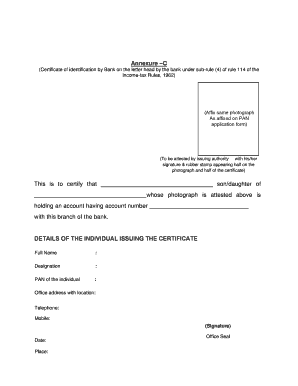
- In the top section of the certificate, affix a photograph that matches the one on your PAN application form. Ensure it follows required guidelines.
- Complete the identification statement by providing your full name and relation to the account holder (e.g., son/daughter) where indicated.
- Input the account holder's details next. Write the account number in the designated field after confirming it is correct.
- Enter the details of the individual issuing the certificate, including their full name, designation, PAN, office address, telephone, and mobile number.
- Ensure the issuing authority attests the photograph with their signature and rubber stamp, with part of the stamp and signature overlapping the photograph.
- Finally, once all fields are filled and verified for accuracy, save your changes. You can then download, print, or share the completed form as needed.
Start completing your Bank Account Holding Certificate online now.
The certified bank letter is a letter written by the bank to prove your ownership of the account.