Loading
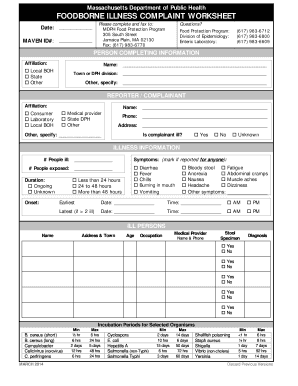
Get Illness Complaint Worksheet
How it works
-

Open form follow the instructions
-

Easily sign the form with your finger
-

Send filled & signed form or save
How to fill out the Illness Complaint Worksheet online
This guide provides clear instructions for completing the Illness Complaint Worksheet online. Follow the steps below to ensure all necessary information is provided accurately.
Follow the steps to complete the Illness Complaint Worksheet effectively.
- Click ‘Get Form’ button to access the Illness Complaint Worksheet and open it in your preferred editor.
- Fill in the date at the top of the form. This date represents when you are completing the complaint.
- Enter your MAVEN ID number. If you do not have one, you may leave this section blank.
- In the 'Person Completing Information' section, indicate your affiliation by selecting the appropriate option: Local BOH, State, or Other.
- Provide your full name, town or DPH division, and any additional specifications in the respective fields.
- In the 'Reporter/Complainant' section, mark your affiliation as either Consumer, Laboratory, Local BOH, Medical provider, State DPH, or Other.
- Fill in your name, phone number, address, and specify if applicable.
- Indicate whether the complainant is ill by marking 'Yes,' 'No,' or 'Unknown.'
- Provide details about the illness: number of people ill, any symptoms reported, and number of individuals exposed.
- Document the onset and duration of symptoms using the choices provided.
- In the 'Ill Persons' section, list all affected individuals, including their name, age, occupation, and medical provider details.
- Complete the 'Food History' section by listing suspect food or drink, including dates, times consumed, and location.
- Provide information about food testing, including the names and addresses of food items available for testing.
- Once all sections are completed, review the form for accuracy and ensure you have filled in all necessary fields.
- After final review, you can save changes, download, or print the form for faxing to the MDPH Food Protection Program.
Begin filling out the Illness Complaint Worksheet online today to ensure your complaint is submitted promptly.
You can say, “I am sorry you are not feeling well,” but do not say, “I am sorry the food made you sick.” Instead, collect information. Ask the customer what they ate that made them sick and when their symptoms started. Find out if others in their group who they dined with are ill as well.