Loading
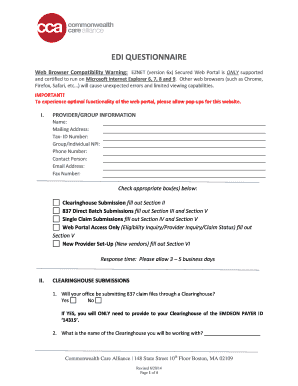
Get Ez Net Commonwealth Care Alliance
How it works
-

Open form follow the instructions
-

Easily sign the form with your finger
-

Send filled & signed form or save
How to fill out the Ez Net Commonwealth Care Alliance online
This guide provides a comprehensive overview of how to accurately fill out the Ez Net Commonwealth Care Alliance form online. It is designed to assist users at all levels of experience in ensuring all required information is securely submitted.
Follow the steps to complete the form effectively.
- Use the ‘Get Form’ button to access the Ez Net Commonwealth Care Alliance document. This action will enable you to obtain the form and open it in your preferred platform.
- Begin by entering the provider/group information in Section I. Fill in your name, mailing address, tax identification number, group or individual NPI, phone number, contact person, email address, and fax number.
- Select the appropriate checkboxes in Section I based on the services your office will provide; for example, check 'Clearinghouse Submission' if applicable. This will guide the next steps to complete.
- If you selected 'Clearinghouse Submission,' provide the name of the clearinghouse you will collaborate with in Section II and indicate whether your office will be submitting 837 claim files through a clearinghouse.
- For '837 Direct Batch Submissions' in Section III, confirm if your office will submit claims in the 837 format and identify the type of transaction you will use by marking the appropriate checkboxes.
- If you're interested in 'Single Claim Submissions' as described in Section IV, indicate 'Yes' or 'No' and note that a WebEx training session is necessary to navigate the submission process.
- In Section V, list the names and user privileges for individuals needing access to the Ez Net web portal. This includes selecting options for 'Web Access Only', 'Single Claim Submissions', or 'Direct Batch Submissions'.
- If you are a new vendor or provider as outlined in Section VI, ensure you supply the required documentation such as a W9 form and indicate your network status. Complete the attached provider template if applicable.
- After filling out all sections carefully, you can save your changes. Download, print, or share the completed form as necessary through the appropriate channels.
Complete your documents online to ensure a streamlined submission process.
EZ NET Provider Portal offers Providers secure, web-based access to health care information, including claims, eligibility, and benefits. And, its secure method protects the HIPAA privacy of our Members. The EZ-NET Provider Portal allows providers access to: Submit claims into the EZ CAP system.