Loading
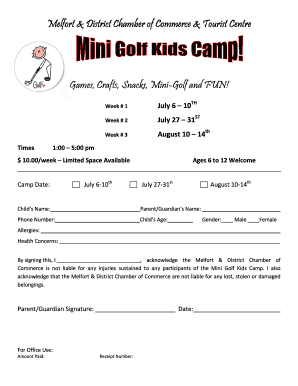
Get Mini Golf Kids Camp Registration Form
How it works
-

Open form follow the instructions
-

Easily sign the form with your finger
-

Send filled & signed form or save
How to fill out the Mini Golf Kids Camp Registration Form online
Filling out the Mini Golf Kids Camp Registration Form online is a straightforward process designed to help you register your child for a fun-filled week. This guide provides clear instructions to ensure that you complete the form accurately and efficiently.
Follow the steps to complete the registration form online.
- Click ‘Get Form’ button to obtain the form and open it in the editor.
- Enter the child's name in the designated field, ensuring correct spelling.
- Select the desired camp date by choosing from July 6-10, July 27-31, or August 10-14.
- Input your phone number in the provided field for contact purposes.
- Fill in your name as the parent or guardian in the appropriate section.
- Indicate the child’s age by entering it in the designated field.
- Choose the child’s gender by checking the appropriate box for male or female.
- If applicable, note any allergies in the allergies section.
- List any health concerns in the health concerns section.
- As the parent or guardian, review the liability acknowledgment and provide your signature in the designated area.
- Enter the date of signing in the date field.
- For office use, ensure the amount paid and receipt number are recorded.
- Once all fields are filled out, save changes, and you may choose to download, print, or share the completed form.
Complete your Mini Golf Kids Camp Registration Form online today!