Loading
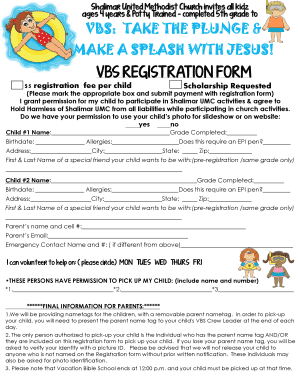
Get Church Make A Splash With Jesus Registration Vbs Regist - Shalimar-umc
How it works
-

Open form follow the instructions
-

Easily sign the form with your finger
-

Send filled & signed form or save
How to fill out the CHURCH MAKE A SPLASH WITH JESUS REGISTRATION VBS REGIST - Shalimar-umc online
Filling out the CHURCH MAKE A SPLASH WITH JESUS REGISTRATION VBS REGIST online is a straightforward process designed to ensure that your child can participate in this exciting event. This guide will provide you with clear instructions on how to complete each section of the registration form.
Follow the steps to successfully register your child online.
- To begin, press the ‘Get Form’ button to access the registration form and open it in your preferred editing tool.
- Review the introductory information provided about the Vacation Bible School (VBS) program. Make sure your child is eligible, which is for those ages 4 years and potty trained to completed 5th grade.
- Complete the registration fee section. The fee is $5 per child. If you require a scholarship, mark the appropriate box and ensure that payment accompanies the registration form.
- Provide permission for your child to participate in Shalimar UMC activities by agreeing to the Hold Harmless agreement outlined in the form.
- Indicate whether you permit the use of your child’s photo in any church-related materials, such as slideshows or the website, by marking 'yes' or 'no'.
- Fill in the details for Child #1, including their name, grade completed, birthdate, any allergies, and whether an EPI pen is required.
- Complete the address section for Child #1, including city, state, and zip code. Also, provide the name of a special friend your child wishes to be with, if applicable.
- Repeat steps 6 and 7 for Child #2, if enrolling multiple children.
- Enter the parent’s name and cell number, along with email address for contact purposes.
- List an emergency contact name and phone number, particularly if it differs from the parent’s information.
- Indicate your availability to volunteer by circling the days you can assist, from Monday to Friday.
- Provide the names and numbers of individuals authorized to pick up your child after the VBS sessions.
- Review the final information provided for parents, ensuring you understand the pick-up procedures and requirements for nametags.
- Once all sections are completed, save your changes. You may then choose to download, print, or share the completed registration form as necessary.
Encourage others to complete their registration for a fun-filled VBS experience by filling out their forms online today!
Industry-leading security and compliance
US Legal Forms protects your data by complying with industry-specific security standards.
-
In businnes since 199725+ years providing professional legal documents.
-
Accredited businessGuarantees that a business meets BBB accreditation standards in the US and Canada.
-
Secured by BraintreeValidated Level 1 PCI DSS compliant payment gateway that accepts most major credit and debit card brands from across the globe.