Loading
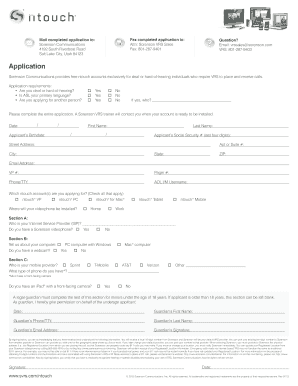
Get New Sorenson Ntouch Vp Print Form
How it works
-

Open form follow the instructions
-

Easily sign the form with your finger
-

Send filled & signed form or save
How to fill out the New Sorenson Ntouch Vp Print Form online
Filling out the New Sorenson Ntouch Vp Print Form online is a straightforward process designed to help individuals who are deaf or hard-of-hearing access necessary communication tools. This guide will walk you through each step to ensure a smooth application experience.
Follow the steps to fill out the form correctly.
- Click 'Get Form' button to acquire the form and open it in your preferred editor.
- Begin by answering the initial questions regarding your hearing status and primary language. Please indicate whether you are applying for yourself or another individual.
- Provide your personal details, including your date of birth, first name, last name, and the last four digits of your social security number.
- Fill in your address information, ensuring to include your street address, apartment or suite number (if applicable), city, state, and ZIP code.
- Indicate your contact information, including your pager number, email address, videophone number, and phone/TTY number, ensuring that each field is complete.
- Specify which ntouch accounts you are applying for by checking the appropriate boxes for ntouch VP, ntouch PC, ntouch for Mac, ntouch Tablet, and ntouch Mobile.
- In Section A, identify your Internet Service Provider and confirm whether you own a Sorenson videophone.
- For Section B, provide information about your computer, including whether it’s a PC or Mac, and indicate if you have a webcam.
- In Section C, list your mobile service provider and specify the type of phone you possess, ensuring it has a front-facing camera.
- If you are applying on behalf of a minor, a legal guardian must complete the designated section, providing their information and signature.
- Review and confirm your understanding of the information provided regarding the 10-digit number and emergency call limitations.
- Complete the application by signing and dating the form. Ensure you have filled out all required fields to avoid delays.
- Once your form is complete, you can save changes, download a copy, print it for your records, or share it as needed.
Begin filling out the New Sorenson Ntouch Vp Print Form online today for quick access to essential communication resources.
Wavello is a VRS experience that allows you to see each other and the interpreter on screen.