Loading
Form preview
  • US Legal Forms
  • Form Library
  • Foreign Forms
  • Foreign Philippines Other Forms
  • Ph Philhealth Csf 2018

Get Ph Philhealth Csf 2018-2026

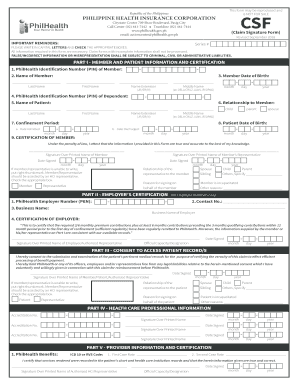
Email: actioncenter philhealth.gov.ph (Claim Signature Form) CSF PHILIPPINE HEALTH INSURANCE CORPORATION Revised September 2018 IMPORTANT REMINDERS: Series # PLEASE WRITE IN CAPITAL LETTERS AND CHECK THE APPROPRIATE BOXES. All information required in this form are necessary. Claim forms with incomplete information shall not be processed. FALSE/INCORRECT INFORMATION OR MISREPRESENTATION SHALL BE SUBJECT TO CRIMINAL, CIVIL OR ADMINISTRATIVE LIABILITIES. PART I - MEMBER AND PATIENT INFORMAT.

How it works

  1. Open form

    Open form follow the instructions

  2. Easily sign form

    Easily sign the form with your finger

  3. Share form

    Send filled & signed form or save

How to fill out the PH PhilHealth CSF online

Filling out the PH PhilHealth Claim Signature Form (CSF) online is a crucial step in ensuring you receive your entitled health benefits. This guide provides a detailed walkthrough of each section to help you complete the form accurately and efficiently.

Follow the steps to successfully complete the form.

  1. Click ‘Get Form’ button to obtain the form and open it in your preferred editor.
  2. In Part I, enter the PhilHealth Identification Number (PIN) of the member. This is a unique identifier essential for processing claims.
  3. Record the PhilHealth Identification Number (PIN) of the dependent, followed by the patient's full name and their relationship to the member, like 'child' or 'spouse'.
  4. Fill in the confinement period by entering the date admitted and date discharged. Make sure to follow the correct format: month, day, and year.
  5. Complete the certification section by having the member sign (or thumbmark if unable to write) and date the form, confirming the accuracy of the information provided.
  6. If applicable, move to Part II to complete the employer's certification. Enter the PhilHealth Employer Number (PEN), business name, and contact number. Have the authorized employer representative sign and date the certification.
  7. In Part III, the member or patient must consent to access their medical records by signing and dating this section, noting their relationship to the patient where necessary.
  8. Part IV focuses on health care professional information. Ensure that accredited professionals complete their sections accurately by signing and providing their details.
  9. Finally, in Part V, document the PhilHealth benefits and include corresponding ICD codes. The authorized HCI representative must then sign and date this portion.
  10. After ensuring all information is complete and accurate, save your changes, and you may choose to download, print, or share the form as needed.

Start completing your documents online today for a smoother claims process.

Get form

Experience a faster way to fill out and sign forms on the web. Access the most extensive library of templates available.
Get form

Related content

Autoimmune Encephalitis in the Philippines: A...
by GT Pagaling · 2022 · Cited by 10 — CSF specimens are usually sent to diagnostic...
Learn more
HR Reminders During Holidays and Breaks
To secure a PhilHealth Claim Signature Form (CSF), please send an email to Mrs. Mary May...
Learn more

Related links form

AU NHVR Add/Delete/Amend Vehicles 2017 NC Tax Return Prepared Food & Beverage Tax 2017 CO DR 2011 2017 FL HSMV 81406 2017

Questions & Answers

Get answers to your most pressing questions about US Legal Forms API.

Contact support

You can claim PhilHealth benefits multiple times, provided you stay within the limits set for specific services. Each claim must be based on valid medical needs and backed by proper documentation. Adhering to the guidelines associated with PH PhilHealth CSF will help you maximize your benefits.

Filing a PhilHealth claim requires you to fill out the appropriate forms and attach any supporting documents. You can submit these either through your healthcare provider or directly to PhilHealth. To streamline this process, familiarize yourself with PH PhilHealth CSF guidelines to ensure that your claim adheres to the necessary requirements.

Yes, PhilHealth does offer reimbursement for health services availed of under certain conditions. To receive reimbursement, you must provide the necessary documentation, including receipts and claim forms. Using PH PhilHealth CSF can streamline the process, ensuring you receive the benefits that you are entitled to.

Filling out the CSF form involves providing accurate personal information such as your name, identification numbers, and contribution history. You can access the form online or obtain a hard copy at PhilHealth offices. Completing the PH PhilHealth CSF form accurately will facilitate your application for benefits.

To file a PH PhilHealth claim, start by gathering all required documents, including your claim forms and supporting medical records. Submit these documents to your healthcare provider or directly to PhilHealth, depending on the service used. Following these steps will help ensure that your claim is processed smoothly.

Withdrawing your PhilHealth contribution involves submitting a request to PhilHealth, as funds are typically retained until you need them for healthcare services. You need to fill out the necessary forms and provide identification. It’s important to know that PH PhilHealth CSF serves various health needs and may reduce the necessity to withdraw funds frequently.

You can update your Member Data Record (MDR) through the PhilHealth website. After logging in to your account, you can navigate to the update section and fill in the necessary details. Keeping your information current is vital for accessing your benefits with PH PhilHealth CSF.

Filling up your PhilHealth forms, such as CF1 and CF2, requires careful attention to detail. Start by gathering all necessary documents, including your identification and contribution records. Follow the instructions provided with each form and consider using tools or platforms like uslegalforms for guided assistance in completing your application smoothly.

Filling up the CF2 form requires you to provide updates or changes to your existing PhilHealth membership details. This includes personal information, dependent information, and contribution history. Ensure that all information is accurate and up-to-date when submitting it to avoid any complications in your healthcare coverage.

You can acquire the CF1 and CF2 forms through the official PhilHealth website or by visiting your nearest PhilHealth office. Additionally, various authorized partners and platforms, like uslegalforms, can assist you in obtaining these forms easily. Having these forms readily accessible ensures you can complete your registration and updates without hassle.

Get This Form Now!

Use professional pre-built templates to fill in and sign documents online faster. Get access to thousands of forms.
Get form
If you believe that this page should be taken down, please follow our DMCA take down processhere.

Industry-leading security and compliance

US Legal Forms protects your data by complying with industry-specific security standards.
  • In businnes since 1997
    25+ years providing professional legal documents.
  • Accredited business
    Guarantees that a business meets BBB accreditation standards in the US and Canada.
  • Secured by Braintree
    Validated Level 1 PCI DSS compliant payment gateway that accepts most major credit and debit card brands from across the globe.
Get PH PhilHealth CSF
Get form
Form Packages
Adoption
Bankruptcy
Contractors
Divorce
Home Sales
Employment
Identity Theft
Incorporation
Landlord Tenant
Living Trust
Name Change
Personal Planning
Small Business
Wills & Estates
Packages A-Z
Form Categories
Affidavits
Bankruptcy
Bill of Sale
Corporate - LLC
Divorce
Employment
Identity Theft
Internet Technology
Landlord Tenant
Living Wills
Name Change
Power of Attorney
Real Estate
Small Estates
Wills
All Forms
Forms A-Z
Form Library
Customer Service
Your Privacy Choices
Terms of Service
Privacy Notice
Legal Hub
Content Takedown Policy
Bug Bounty Program
About Us
Help Portal
Legal Resources
Blog
Affiliates
Contact Us
Delete My Account
Site Map
Industries
Forms in Spanish
Localized Forms
State-specific Forms
Forms Kit
Legal Guides
Real Estate Handbook
All Guides
Prepared for You
Notarize
Incorporation services
Our Customers
For Consumers
For Small Business
For Attorneys
Our Sites
US Legal Forms
USLegal
FormsPass
pdfFiller
signNow
altaFlow
DocHub
Instapage
Social Media
Call us now toll free:
+1 833 426 79 33
As seen in:
  • USA Today logo picture
  • CBC News logo picture
  • LA Times logo picture
  • The Washington Post logo picture
  • AP logo picture
  • Forbes logo picture
© Copyright 1997-2026
airSlate Legal Forms, Inc.
3720 Flowood Dr, Flowood, Mississippi 39232
Form Packages
Adoption
Bankruptcy
Contractors
Divorce
Home Sales
Employment
Identity Theft
Incorporation
Landlord Tenant
Living Trust
Name Change
Personal Planning
Small Business
Wills & Estates
Packages A-Z
Form Categories
Affidavits
Bankruptcy
Bill of Sale
Corporate - LLC
Divorce
Employment
Identity Theft
Internet Technology
Landlord Tenant
Living Wills
Name Change
Power of Attorney
Real Estate
Small Estates
Wills
All Forms
Forms A-Z
Form Library
Customer Service
Your Privacy Choices
Terms of Service
Privacy Notice
Legal Hub
Content Takedown Policy
Bug Bounty Program
About Us
Help Portal
Legal Resources
Blog
Affiliates
Contact Us
Delete My Account
Site Map
Industries
Forms in Spanish
Localized Forms
State-specific Forms
Forms Kit
Legal Guides
Real Estate Handbook
All Guides
Prepared for You
Notarize
Incorporation services
Our Customers
For Consumers
For Small Business
For Attorneys
Our Sites
US Legal Forms
USLegal
FormsPass
pdfFiller
signNow
altaFlow
DocHub
Instapage
Social Media
Call us now toll free:
+1 833 426 79 33
As seen in:
  • USA Today logo picture
  • CBC News logo picture
  • LA Times logo picture
  • The Washington Post logo picture
  • AP logo picture
  • Forbes logo picture
© Copyright 1997-2026
airSlate Legal Forms, Inc.
3720 Flowood Dr, Flowood, Mississippi 39232