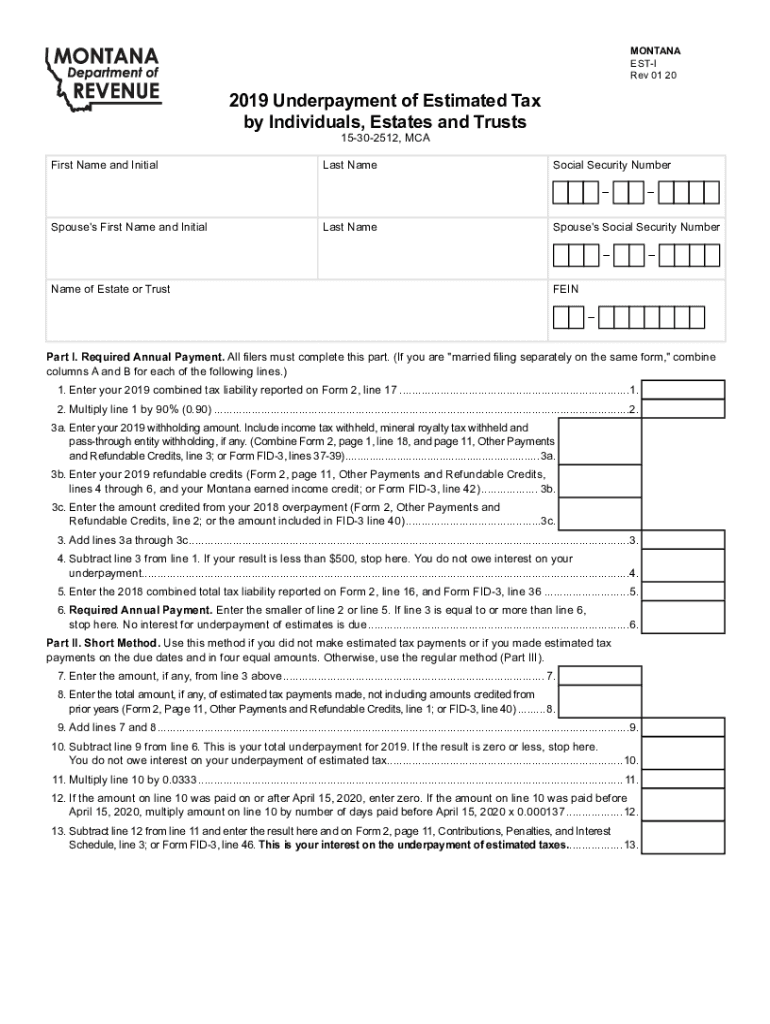
Clear FormMONTANA ESTI Rev 01 202019 Underpayment of Estimated Tax by Individuals, Estates and Trusts 15302512, MCAFirst Name and InitialLast NameSocial Security NumberSpouse 's First Name and InitialLast.
Loading

Open form follow the instructions

Easily sign the form with your finger

Send filled & signed form or save
How to fill out the MT DoR EST-I online
This guide provides comprehensive instructions for users looking to fill out the MT DoR EST-I form, aimed at determining any interest owed on the underpayment of estimated tax. Whether you are a seasoned taxpayer or someone new to this process, these steps will help you navigate through the form with ease.
Follow the steps to complete the MT DoR EST-I online.
- Click the 'Get Form' button to obtain the MT DoR EST-I form and open it in your preferred document editor.
- Begin filling out the first section by entering your first name, last name, and social security number in the respective fields. If applicable, include your spouse's information in the designated fields.
- In Part I, required annual payment, start by entering your combined tax liability from the previous year's form. Ensure you follow the instructions carefully, and remember to combine amounts if filing jointly and specified as 'married filing separately'.
- Next, complete the computation for withholding amounts in line 3a, 3b, and 3c, ensuring to combine as directed. Follow each calculation step until you reach line 6 where you determine your required annual payment.
- If you are eligible for the Short Method, move to Part II. Enter the amounts as instructed, particularly focusing on whether estimated tax payments were made on time and in the correct amounts for line 7 and line 8.
- In Part III, if you made payments of unequal amounts, complete the Regular Method section. Follow instructions closely from line 14 to line 28, where you will also calculate interest if applicable.
- If your income varied throughout the year, consider filling out Part IV, Annualized Income Installment Method Worksheet. Complete this section by calculating the adjusted gross income over the specified periods.
- Once all sections are filled out accurately, review your entries for correctness. Then, you can save your changes, download, print, or share the form accordingly.
Complete your MT DoR EST-I form online today to ensure timely filing and to manage your estimated tax payments effectively.
Experience a faster way to fill out and sign forms on the web. Access the most extensive library of templates available.
Related content
No information is available for this page.Learn why
by KE Powell · Cited by 4 — Surveyor 60, 1, 1 (June 2007); DOR estimation provided to...
According to the Bible, the golden calf (עֵגֶּל הַזָהָב 'ēggel hazāhāv)...
Get answers to your most pressing questions about US Legal Forms API.
Online Services - Montana Department of Revenue
To check the status of your Montana refund online, go to https://tap.dor.mt.gov/ and then under the sub-heading Individuals click on Where's My Refund.
Contact - Montana Department of Revenue
Fortunately, the IRS has a procedure to help. If your third-round stimulus payment is lost, stolen or destroyed, you can ask the IRS to perform a "payment trace" to see if your check was cashed or direct deposit misdirected. Ultimately, if everything goes smoothly, you'll be issued a new payment. That's the good news.
TransAction Portal (TAP) - Montana Department of Revenue
To check the status of your Montana refund online, go to https://tap.dor.mt.gov/ and then under the sub-heading Individuals click on Where's My Refund.
Where is my stimulus Montana?
You can check on the status of your COVID-19 Stimulus payment at IRS.gov/Coronavirus/Get-My-Payment.
Where is my stimulus check Montana?
You can check on the status of your COVID-19 Stimulus payment at IRS.gov/Coronavirus/Get-My-Payment.
Montana Department of Revenue: Home
You can make payments online using the TransAction Portal (TAP), or find your payment voucher in My Revenue.
Montana State Tax Returns for 2020, 2021 on eFile.com
Montana Individual Income Tax Return (2020) You may use this form to file your Montana individual income tax return. This is the long form.
Can I pay Montana property taxes online?
Payment and Filing Options You can make payments online using the TransAction Portal (TAP), or find your payment voucher in My Revenue.
Use professional pre-built templates to fill in and sign documents online faster. Get access to thousands of forms.
If you believe that this page should be taken down, please follow our DMCA take down process here.