Loading
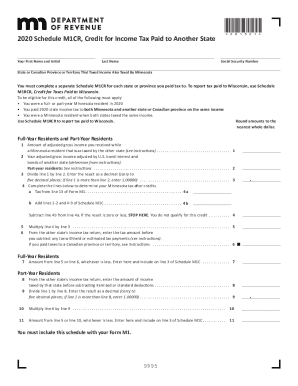
Get Mn Dor Schedule M1cr 2020-2026
How it works
-

Open form follow the instructions
-

Easily sign the form with your finger
-

Send filled & signed form or save
How to fill out the MN DoR Schedule M1CR online
Filling out the MN DoR Schedule M1CR can seem daunting, but with clear instructions, you can complete it efficiently. This guide will provide step-by-step directions to help you fill out the form accurately and meet your tax obligations.
Follow the steps to complete your Schedule M1CR online.
- Press the ‘Get Form’ button to access the MN DoR Schedule M1CR and open it in your editor.
- Begin by entering your first name and initial in the designated field, followed by your last name.
- Input your Social Security number in the appropriate section without any dashes.
- Indicate the state or Canadian province or territory that taxed your income also taxed by Minnesota.
- For each state or province you paid tax to, complete a separate Schedule M1CR.
- Ensure you meet the eligibility criteria: being a full- or part-year Minnesota resident, paying state income tax to both Minnesota and another state on the same income, and being a Minnesota resident when both states taxed the income.
- In line 1, input the amount of adjusted gross income received while a Minnesota resident that was taxed by the other state.
- For line 2, enter your adjusted gross income adjusted by U.S. bond interest, referring to the instructions for details.
- Complete line 3 by dividing line 1 by line 2 and entering the result as a decimal.
- Follow the instructions for lines 4 to 11, which include various calculations based on your tax details from Minnesota and the other state.
- At the end of the process, save your changes, download the completed form, or share it as needed.
Complete your MN DoR Schedule M1CR online today to ensure you receive any applicable credits.
Related links form
The Pass-Through Entity (PTE) Tax allows an entity to pay a tax on behalf of their partners, members, or shareholders.