Loading
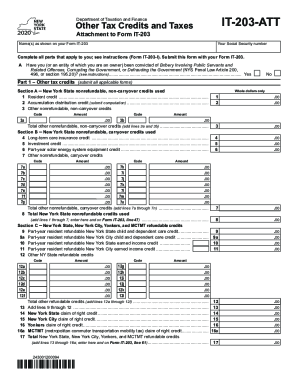
Get Ny It-203-att 2020
How it works
-

Open form follow the instructions
-

Easily sign the form with your finger
-

Send filled & signed form or save
How to fill out the NY IT-203-ATT online
Navigating forms can be challenging, especially when it comes to tax documents. This guide aims to simplify the process of filling out the NY IT-203-ATT, making it accessible for all users, regardless of their prior experience with tax forms.
Follow the steps to successfully complete the NY IT-203-ATT online.
- Press the ‘Get Form’ button to access the NY IT-203-ATT document and open it in your browser's editor.
- Begin filling in your name as it appears on the Form IT-203 and your Social Security number in the designated fields.
- Indicate whether you or an entity of which you are an owner has been convicted of specified crimes by selecting ‘Yes’ or ‘No’.
- Move to Part 1, where you will complete sections on other tax credits. Begin with Section A to report any nonrefundable, non-carryover credits used.
- Detail any applicable credits, including the resident credit and any accumulation distribution credits, by entering the code and amount in the spaces provided.
- Proceed to Section B for nonrefundable carryover credits. Ensure to list all applicable credits with whole dollar amounts.
- In Section C, report any refundable credits for New York State, New York City, and Yonkers, and enter appropriate amounts.
- Complete Part 2 by identifying any other New York State taxes, ensuring to tally all amounts accurately as indicated.
- Finalize your form by reviewing all entries for accuracy.
- Save your changes, and consider downloading, printing, or sharing the completed form as needed.
Complete your documents online to ensure a smooth filing process.
Get form
Experience a faster way to fill out and sign forms on the web. Access the most extensive library of templates available.
As a nonresident, you only pay tax on New York source income, which includes earnings from work performed in New York State, and income from real property located in the state.
Get This Form Now!
Use professional pre-built templates to fill in and sign documents online faster. Get access to thousands of forms.