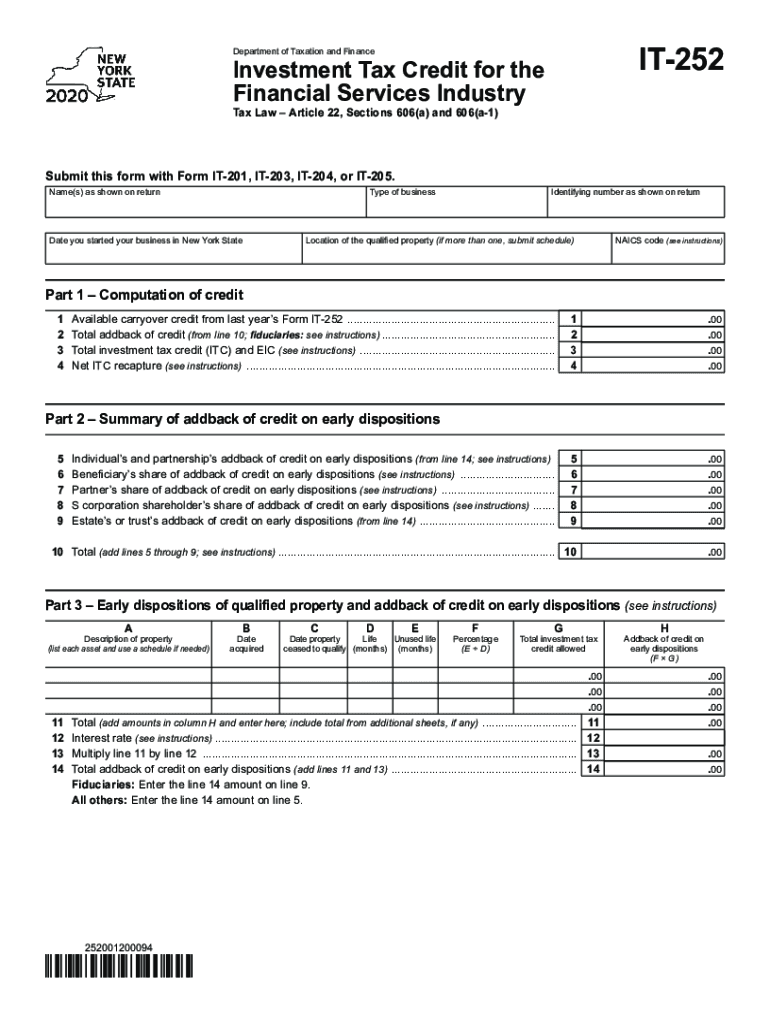
IT252Department of Taxation and FinanceInvestment Tax Credit for the Financial Services Industry Tax Law Article 22, Sections 606(a) and 606(a1)Submit this form with Form IT201, IT203, IT204, or.
Loading

Open form follow the instructions

Easily sign the form with your finger

Send filled & signed form or save
How to fill out the NY IT-252 online
The NY IT-252 form is essential for claiming the investment tax credit for the financial services industry in New York State. This guide provides a comprehensive step-by-step approach to help users complete the form accurately and efficiently online.
Follow the steps to fill out the NY IT-252 form online.
- Click ‘Get Form’ button to access the NY IT-252 form and open it in your preferred online editor.
- Enter your name(s) as they appear on your tax return in the designated field.
- Indicate the type of business you operate in the appropriate section.
- Provide the date you started your business in New York State.
- Input your identifying number as shown on your return.
- List the location of the qualified property. If you have more than one property, submit a schedule.
- Enter the NAICS code as per the provided instructions.
- Complete Part 1 by calculating the total investment tax credit, ensuring to sum all relevant line items. This will be entered on line 10.
- Move to Part 2 and indicate any addbacks of credit on early dispositions, following the instructions for each line.
- In Part 3, provide details on each early disposition of qualified property, including descriptions, dates, and percentages.
- Conclude with Part 5 and calculate the application of credits and any carryover amounts. Ensure all figures are accurately captured.
- Once all fields are filled in, review your form for completeness and correctness.
- Finally, save your changes, and you can choose to download, print, or share the completed form as needed.
Complete your NY IT-252 form online today!
Experience a faster way to fill out and sign forms on the web. Access the most extensive library of templates available.
Related content
General information. The investment tax credit (ITC) for the financial services industry...
4041 Southwestern Blvd. Orchard Park, NY 14127 (716) 851-1322. Map Directions · Campus...
Use Form: IT-2 to: report wages and NYS, NYC, or Yonkers tax withheld (do not...
Use professional pre-built templates to fill in and sign documents online faster. Get access to thousands of forms.
If you believe that this page should be taken down, please follow our DMCA take down process here.
This form is available in several versions. Select the version you need from the drop-down list below.