Loading
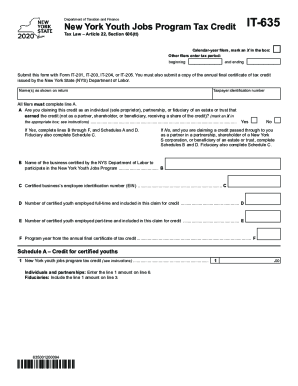
Get Ny It-635 2020
How it works
-

Open form follow the instructions
-

Easily sign the form with your finger
-

Send filled & signed form or save
How to fill out the NY IT-635 online
The NY IT-635 form is essential for individuals and organizations seeking to claim the New York Youth Jobs Program Tax Credit. This guide provides clear, step-by-step instructions to help users complete the form accurately and efficiently online.
Follow the steps to successfully fill out the NY IT-635 online.
- Click ‘Get Form’ button to obtain the form and open it in your editing tool.
- Identify your filing status by marking an X in the appropriate box for calendar-year filers or entering your tax period dates.
- Enter your name(s) as shown on your tax return, followed by your taxpayer identification number.
- Indicate whether you are claiming the credit as an individual, partnership, or fiduciary by marking an X in the correct box on line A. If yes, complete lines B through F, and Schedules A and D. If no, proceed to complete Schedules B and D.
- For line B, provide the name of the business certified by the NYS Department of Labor that participated in the program.
- Fill in the certified business’s employee identification number (EIN) on line C.
- On line D, indicate the number of certified youth employed full-time included in your claim for credit.
- On line E, indicate the number of certified youth employed part-time included in your claim.
- Enter the program year from your annual final certificate of tax credit on line F.
- Complete Schedule A to report the tax credit amount for certified youths, following the specified instructions.
- If applicable, complete Schedule B for partners, shareholders, or beneficiaries who received a share of the credit, listing each entity's details.
- If you are a fiduciary, complete Schedule C to outline the beneficiary’s share of the credit.
- On Schedule D, input the amounts from previous lines to compute the total credit claimed.
- After completing all necessary sections, save your changes. You may also download, print, or share the completed form as needed.
Begin your process of completing the NY IT-635 online today!
Get form
Experience a faster way to fill out and sign forms on the web. Access the most extensive library of templates available.
Related links form
Get This Form Now!
Use professional pre-built templates to fill in and sign documents online faster. Get access to thousands of forms.