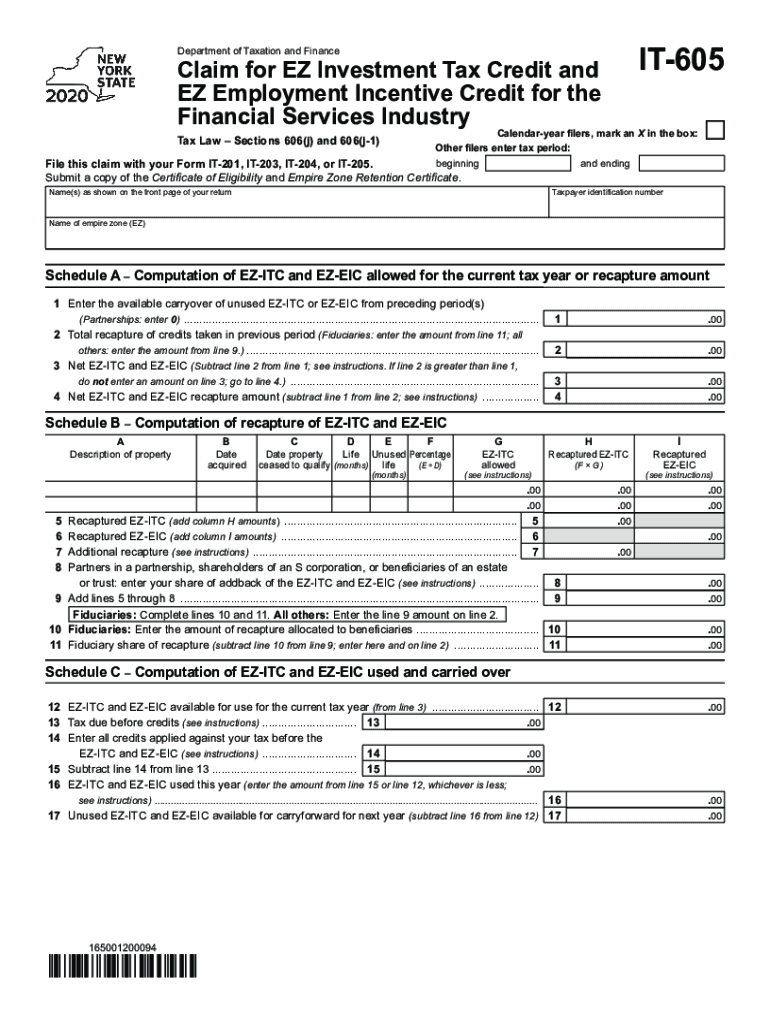
IT605Department of Taxation and FinanceClaim for EZ Investment Tax Credit and EZ Employment Incentive Credit for the Financial Services Industry Tax Law Sections 606(j) and 606(j1)Calendaryear filers,.

Open form follow the instructions

Easily sign the form with your finger

Send filled & signed form or save
How to fill out the NY IT-605 online
The NY IT-605 is an essential form for claiming the EZ Investment Tax Credit and EZ Employment Incentive Credit specific to the financial services industry. This guide aims to provide clear, step-by-step instructions for users to complete this form accurately online.
Follow the steps to successfully complete the NY IT-605.
- Click ‘Get Form’ button to access the form and open it for editing.
- Indicate whether you are a calendar-year filer by marking an X in the appropriate box. If you are not a calendar-year filer, enter your tax period's beginning and ending dates in the provided fields.
- Ensure you file this claim alongside your Form IT-201, IT-203, IT-204, or IT-205. You will need to submit a copy of both the Certificate of Eligibility and the Empire Zone Retention Certificate.
- In the field for names, enter the names as shown on the front page of your tax return. Then input your taxpayer identification number accurately.
- Identify your Empire Zone by entering its name in the designated field.
- Move to Schedule A and begin with line 1. Enter the carryover of unused EZ-ITC or EZ-EIC from prior periods. If you are part of a partnership, enter 0.
- For line 2, input the total recapture of credits taken in previous periods. If you are a fiduciary, use the amount from line 11; otherwise, use the amount from line 9.
- Calculate line 3 by subtracting line 2 from line 1. If line 2 exceeds line 1, leave line 3 blank and proceed to line 4.
- For line 4, determine the net EZ-ITC and EZ-EIC recapture amount by subtracting line 1 from line 2, as per the instructions.
- Continue to Schedule B and fill in the description of the property, acquisition date, and other relevant columns accurately.
- For Schedule C, start with line 12 to denote the EZ-ITC and EZ-EIC available for the current tax year as noted from line 3.
- Follow through the remaining fields, including calculating taxes due before credits, and subsequent lines that track EZ-ITC and EZ-EIC used and carried over.
- Once all fields are filled out correctly, review the document for accuracy. You can then save changes, download, print, or share the completed form as needed.
Complete your NY IT-605 online today to effectively claim your tax credits.
Experience a faster way to fill out and sign forms on the web. Access the most extensive library of templates available.
Related content
(ESD) must be submitted with Form IT-605 each year the carryforward of the credit is...
IT 605 - Network Architecture ... 2019 SUNY Potsdam The State University of New York at...
Use Form: IT-2 to: report wages and NYS, NYC, or Yonkers tax withheld (do ... IT-605 2017...
Use professional pre-built templates to fill in and sign documents online faster. Get access to thousands of forms.
If you believe that this page should be taken down, please follow our DMCA take down process here.
This form is available in several versions. Select the version you need from the drop-down list below.