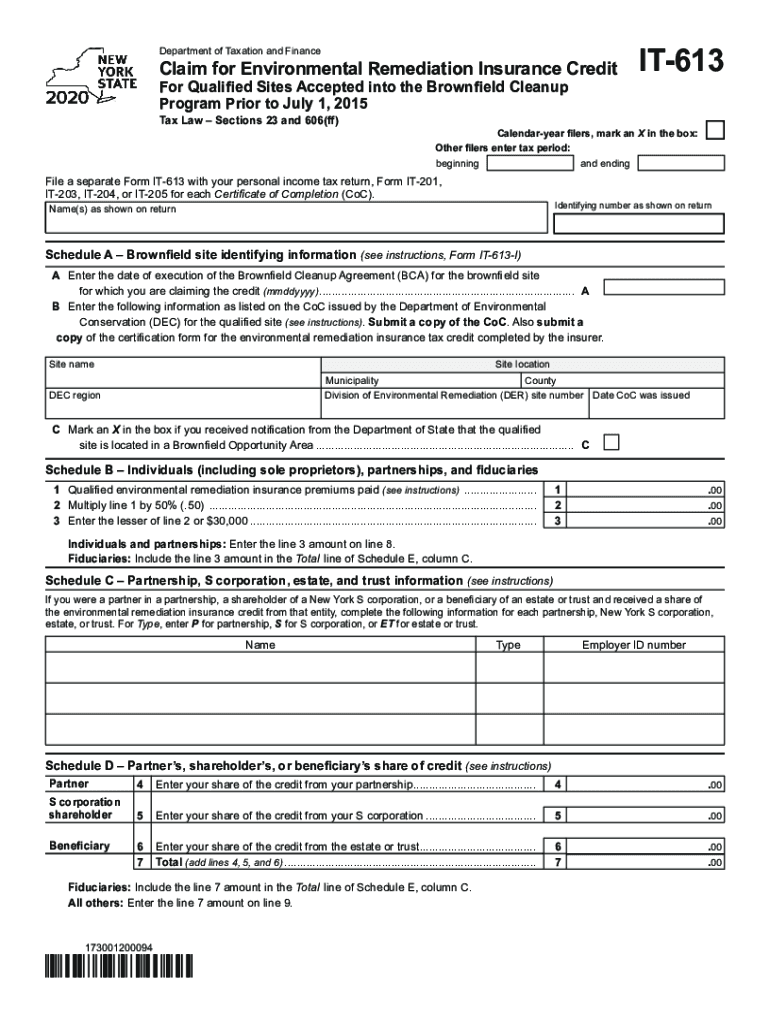
Department of Taxation and FinanceClaim for Environmental Remediation Insurance Credit For Qualified Sites Accepted into the Brownfield Cleanup Program Prior to July 1, 2015 Tax Law Sections 23 and.
Loading

Open form follow the instructions

Easily sign the form with your finger

Send filled & signed form or save
How to fill out the NY IT-613 online
The NY IT-613 form is essential for individuals and entities claiming the Environmental Remediation Insurance Credit for qualified sites in New York. This guide will provide clear instructions on how to complete the form accurately and efficiently in an online format.
Follow the steps to fill out the NY IT-613 with ease.
- Press the ‘Get Form’ button to access the NY IT-613 form and open it for completion.
- Indicate your filing status by marking an ‘X’ in the box for calendar-year filers. Other filers should enter the tax period with both beginning and ending dates.
- Provide your name(s) as they appear on your tax return and your identifying number.
- In Schedule A, enter the date of execution of the Brownfield Cleanup Agreement for the qualified site in the specified format (mmddyyyy).
- Enter the site name, location, DEC region, municipality, and county as listed on your Certificate of Completion issued by the Department of Environmental Conservation. Make sure to attach a copy of the Certificate.
- Mark the box in Schedule A if you have received notification from the Department of State that the site is in a Brownfield Opportunity Area.
- In Schedule B, list the qualified environmental remediation insurance premiums you have paid.
- Multiply the amount from Schedule B line 1 by 50% and record it on line 2.
- Enter the lesser amount between line 2 and $30,000 on line 3. This amount will be used differently based on your type of filing (individuals and partnerships, or fiduciaries).
- Complete Schedule C with information about any partnerships, S corporations, or trusts where you received a share of the credit.
- For Schedule D, enter your share of the credit from partnerships, S corporations, or estates/trusts as applicable, and compute the total on line 7.
- In Schedule E, provide the beneficiary’s name, identifying number, and share of the credit as needed.
- Fill out Schedule F by entering the relevant amounts from previous schedules, culminating in the total environmental remediation insurance credit.
- Complete Schedule G if any recapture of the environmental remediation insurance credit applies, summing the appropriate amounts.
- After completing all sections, review for accuracy. Save your changes, then download, print, or share the form as required.
Start completing your NY IT-613 form online today!
Experience a faster way to fill out and sign forms on the web. Access the most extensive library of templates available.
Related content
If you were a partner in a partnership, a shareholder of a New York S corporation, or a...
You moved into or out of NYC or Yonkers. • You itemize your deductions on your personal...
Visit www.tax.ny.gov to file and learn more. If you do file a paper return, you may need...
Use professional pre-built templates to fill in and sign documents online faster. Get access to thousands of forms.
If you believe that this page should be taken down, please follow our DMCA take down process here.
This form is available in several versions. Select the version you need from the drop-down list below.