Loading
Get Az Form 312 2019
How it works
-

Open form follow the instructions
-

Easily sign the form with your finger
-

Send filled & signed form or save
How to fill out the AZ Form 312 online
Filling out the AZ Form 312 online is a straightforward process that allows you to claim credits for agricultural water conservation systems. This guide will walk you through each section of the form with clear instructions to ensure your submission is accurate and complete.
Follow the steps to successfully complete the AZ Form 312 online.
- Click ‘Get Form’ button to access the form and open it in the designated area.
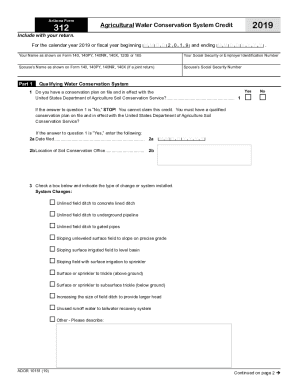
- In the first section, enter your name as shown on your tax return forms. Make sure to include your Social Security Number or Employer Identification Number. If filing jointly, also provide the spouse's name and Social Security Number.
- Proceed to Part 1 regarding the qualifying water conservation system. Answer Question 1 by selecting 'Yes' or 'No'. If 'No', you cannot claim the credit and should stop filling the form.
- If you answered 'Yes' to Question 1, fill in the date the conservation plan was filed and the location of the Soil Conservation Office.
- For Question 3, select the type of changes or systems installed by checking the corresponding box. If applicable, provide a description for any other changes.
- In Part 2, calculate the current taxable year’s credit. Record the total amount of qualifying expenses and any reimbursements in the designated fields. Complete the calculation for net qualifying expenses and multiply by 75% to find the credit.
- If applicable, enter amounts from any received Form 312-P or Form 312-S for pass-through credits, as instructed.
- In Part 3, if you are carrying forward credits from previous years, enter the respective amounts in the designated columns and calculate the available carryover.
- Finally, in Part 4, record the current year’s credit and available credit carryover amounts as instructed. Total these amounts and ensure they are correctly noted for Form 301.
- Once all sections are completed, ensure you save your changes. You may also download, print, or share the completed form as needed.
Start filling out your AZ Form 312 online today to efficiently manage your agricultural water conservation credits.
Get form
Experience a faster way to fill out and sign forms on the web. Access the most extensive library of templates available.
Related links form
Get This Form Now!
Use professional pre-built templates to fill in and sign documents online faster. Get access to thousands of forms.