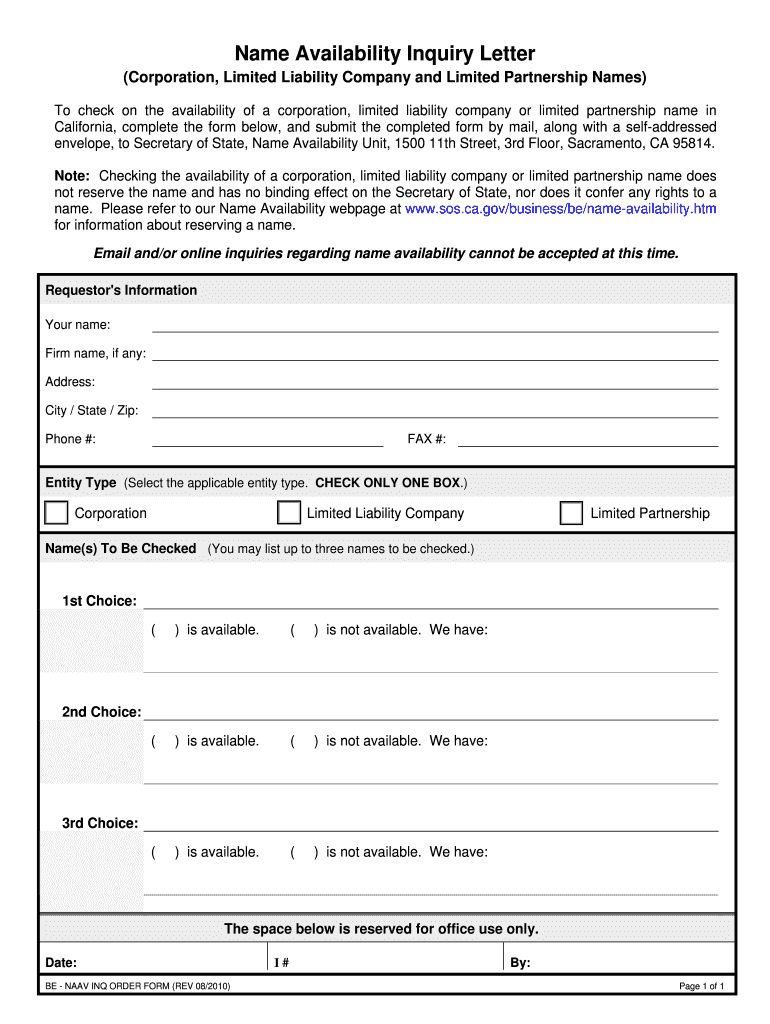
Name Availability Inquiry Letter (Corporation, Limited Liability Company and Limited Partnership Names) To check on the availability of a corporation, limited liability company or limited partnership.
Loading

Open form follow the instructions

Easily sign the form with your finger

Send filled & signed form or save
How to fill out the CA Name Availability Inquiry Letter online
This guide provides clear instructions on how to complete the CA Name Availability Inquiry Letter. By following these steps, users will be equipped to efficiently check the availability of their desired entity names.
Follow the steps to complete the CA Name Availability Inquiry Letter online.
- Press the ‘Get Form’ button to access the CA Name Availability Inquiry Letter and open it in the designated editor.
- Fill in your personal information in the 'Requestor's Information' section. Provide your full name, firm name if applicable, address, city, state, zip code, phone number, and fax number.
- Select the entity type by checking only one box that corresponds to your inquiry. The options include: Corporation, Limited Liability Company, or Limited Partnership.
- In the 'Name(s) To Be Checked' section, provide up to three names. For each name listed as your first, second, or third choice, mark its availability by checking the corresponding box. Indicate whether each name is available or not.
- Ensure all entries are complete and accurate. Review your information to confirm that it reflects your intentions accurately.
- After completing the form, save your changes, and you may choose to download, print, or share the form as needed.
Complete your forms online and check your desired entity names today!
Experience a faster way to fill out and sign forms on the web. Access the most extensive library of templates available.
Related content
To check on the availability of a corporation, limited liability company or limited...
The students will receive a model of what a letter of inquiry is and what...
SECTION 1 — TYPE OF INFORMATION REQUESTED (Check only one box per request) ... NAME...
Get answers to your most pressing questions about US Legal Forms API.
How do I check to see if a business name is available in California?
Step 1: Visit the Business Name Database. Go to the California Secretary of State's website. Step 2: Search your Business Name. Select the type of entity you are searching for (Corporation or LP/LLC), enter your desired name, and click Search. ... Step 3: Review Results.
How do I check the status of my LLC in California?
Search the California Secretary of State's website. There, you should see an option for "Business Search." Here, you can run a search for any corporations, limited partnerships, and LLCs registered in California.
Name Reservation Request - CA.gov
To do this, simply go down to your county clerk's office and see if the name is registered or on a list of fictitious names for businesses (in a few states, there is a statewide fictitious business names database that your county clerk can find and inform you).
How to Look Up an LLC in California | legalzoom.com
Check your home state's records. Start your search by going to the website for the Secretary of State in the state where you will operate your business. ... Check the records of other states. ... Search trademark registrations. ... Search Google and social media.
How to Search Available Business Names in California ...
Go to www.sos.ca.gov/business-programs/business-entities/processing-dates for the current processing dates at our Sacramento office. Only one reservation will be made per request form. You may list up to three names, in order of preference, and the first available name will be reserved for a period of 60 days.
How do I look up an LLC in California?
Search the California Secretary of State's website. On your computer or favorite mobile device, head over to the Business Entities section of the California Secretary of State's website. ... Locate the desired LLC. ... Download LLC documents. ... Request certified LLC documents.
How To Find Out If Your Business Name Is Available - Broadly.com
How to Reserve a Business Name. Once you have settled on a name for your California LLC or corporation, you can reserve the name by submitting a Name Reservation Request. This form can be mailed to the Secretary of State or delivered in-person. There is a $10 filing fee for all Name Reservation Requests.
How do I reserve a name in California?
Go to www.sos.ca.gov/business-programs/business-entities/processing-dates for the current processing dates at our Sacramento office. Only one reservation will be made per request form. You may list up to three names, in order of preference, and the first available name will be reserved for a period of 60 days.
How Do I Know if My LLC Name Already Exists? | legalzoom.com
Check existing names and reserve a name not already in use by mail or in person with the Secretary of State. File a fictitious name statement with your county clerk's office, if applicable. Register your business as a legal entity (e.g., LLC or corporation).
Use professional pre-built templates to fill in and sign documents online faster. Get access to thousands of forms.
If you believe that this page should be taken down, please follow our DMCA take down process here.