Loading
Get Maintenance And Repair Log
How it works
-

Open form follow the instructions
-

Easily sign the form with your finger
-

Send filled & signed form or save
How to fill out the Maintenance And Repair Log online
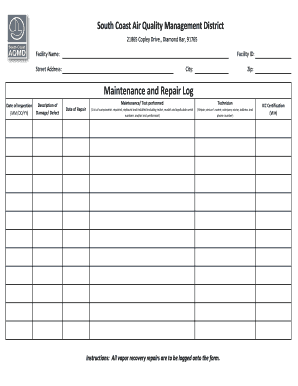
The Maintenance And Repair Log is a critical tool for documenting inspections and repairs of equipment. This guide provides detailed instructions for accurately completing the form online, ensuring that all necessary information is recorded clearly and efficiently.
Follow the steps to complete your Maintenance And Repair Log online.
- Click the ‘Get Form’ button to access the Maintenance And Repair Log and open it in the editing interface.
- Begin by filling in the 'Facility Name' field with the official name of the facility where the maintenance or repair is being conducted.
- Enter the 'Facility ID,' which is a unique identifier associated with your facility.
- In the 'Street Address' field, input the complete street address of the facility, ensuring accuracy in the details.
- Next, fill out the 'City' and 'Zip' fields with the appropriate information based on the facility's location.
- Record the 'Date of Inspection' using the format MM/DD/YY to document when the inspection took place.
- In the 'Description of Damage/Defect' section, provide a clear and detailed description of the damage or defect observed during the inspection.
- Log the 'Date of Repair' in the same MM/DD/YY format to indicate when repairs were completed.
- Detail the 'Maintenance/Test performed' section by indicating all maintenance activities carried out and relevant tests performed.
- In the 'Technician' field, list the name of the repair person along with their company name, address, and phone number for future reference.
- If applicable, include the ICC Certification number in the designated field (VI #) for compliance and verification purposes.
- Review all entered information for accuracy and completeness before finalizing your log.
- Once satisfied, save your changes, and consider downloading, printing, or sharing the form as necessary for record-keeping.
Complete your Maintenance And Repair Log online today to maintain accurate and efficient records.
Items to Keep for 7 YearsKeep your original receipts until you get your monthly statement; shred the receipts if the two match up. Keep the statements for seven years if tax-related expenses are documented.
Industry-leading security and compliance
US Legal Forms protects your data by complying with industry-specific security standards.
-
In businnes since 199725+ years providing professional legal documents.
-
Accredited businessGuarantees that a business meets BBB accreditation standards in the US and Canada.
-
Secured by BraintreeValidated Level 1 PCI DSS compliant payment gateway that accepts most major credit and debit card brands from across the globe.