Loading
Form preview
  • US Legal Forms
  • Other Templates
  • Foreign Forms
  • Foreign India Other Forms
  • In Obc Application Form For Atm/debit Card For Individuals

Get In Obc Application Form For Atm/debit Card For Individuals

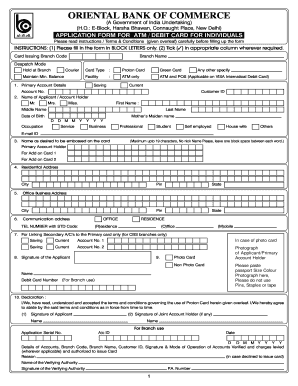
R other legal or natural entity or organisation. DEBIT/ATM CARD or Card refers to the Oriental Bank of Commerce VISA International DEBIT/ATM CARD or domestic ATM Card issued by the bank to its Account Holder/s (hereinafter referred to as Customer) for using the Automated Teller Machines (ATMs), and for using at Merchant Establishments wherever located which honour the Card. Cardholder means the approved Customer who has requested for the DEBIT/ATM CARD upon his/her undertaking to abide by the te.

How it works

  1. Open form

    Open form follow the instructions

  2. Easily sign form

    Easily sign the form with your finger

  3. Share form

    Send filled & signed form or save

How to fill out the IN OBC Application Form for ATM/Debit Card for Individuals online

Filling out the IN OBC application form for an ATM/Debit card online can be a streamlined process when you follow the correct steps. This guide provides a detailed, step-by-step approach to help you complete the application accurately and efficiently.

Follow the steps to successfully complete your ATM/Debit card application form

  1. Press the ‘Get Form’ button to obtain the application form and open it in your preferred editor.
  2. Complete the personal details section. Fill in your first name, middle name, and last name, ensuring that they are clearly printed in BLOCK LETTERS. Also, provide your date of birth in the specified format (DD MM YYYY).
  3. Input your occupation. You can choose from pre-defined options such as employed, student, self-employed, business, or provide another description. Additionally, enter your mother’s maiden name as requested.
  4. In the residential address section, provide your complete address including city and state. If you have a communication address that differs from your residential address, fill that out in the respective field.
  5. Enter your email ID. Make sure it is current and accessible, as this may be used for further communication regarding your application.
  6. Specify the primary account details. You will need to provide the account type (savings or current) and the account number as well.
  7. If you wish to have additional cards linked to your primary account, you can fill out the details for the add-on cards, including the names as you wish them to be embossed.
  8. Paste a passport size color photograph in the designated area. Ensure that you do not use pins, staples, or tape to secure the photo.
  9. Sign the application form. If applicable, ensure that any joint account holders also sign in the specified area.
  10. Review all the filled-in information for accuracy. Once satisfied, finalize your submission, making sure to save any changes if required. Then download or print your application for your records.

Complete your IN OBC ATM/Debit card application form online today for a hassle-free banking experience!

Get form

Experience a faster way to fill out and sign forms on the web. Access the most extensive library of templates available.
Get form

Related content

A Guide to the Foreign Service - State.gov
Obtain an ATM card. • Get general, durable, bank, and medical powers of attorney. • If...
Learn more
Financial Inclusion and Maharashtra's...
by KF Variyava · 2025 — The lack of clear identity documentation for the poor is one of...
Learn more
Byte Mar 1988
Call our Customer Service. Department at (408) 438-8400 for your free PDRP inrormation kit...
Learn more

Related links form

Okaloosa County Notice Of Commencement Ori Code Ca0349400 Mississippi Disabled Parking Application 2020 Keller Williams Offer To Purchase Form 2020

Questions & Answers

Get answers to your most pressing questions about US Legal Forms API.

Contact support

Activating your First bank ATM card typically involves visiting an ATM and inserting your card. Follow the prompts to enter your PIN for activation. If there are issues, consider checking your IN OBC Application Form for ATM/Debit Card for Individuals for any additional instructions specific to your card type.

When writing a letter to apply for an ATM card, begin with your address and the date, followed by the bank's address. Politely request the issuance of an ATM card, including your account details for easy identification. Mention your IN OBC Application Form for ATM/Debit Card for Individuals as part of your supporting documents to streamline your request.

Filling up a new ATM card application requires accurate personal information including your name, account details, and contact information. Be thorough to avoid any mistakes that might delay the processing. You may also want to refer to your IN OBC Application Form for ATM/Debit Card for Individuals for additional guidance on completing the application.

To write an application form for a debit card, start with your personal details such as name and address. Clearly express that you are applying for a debit card and include your account number for reference. Using guidelines from your IN OBC Application Form for ATM/Debit Card for Individuals can help ensure you include all necessary information.

You can request to activate your ATM card by contacting your bank through their customer service number or visiting a local branch. Provide your card details and request activation directly. It may also be useful to mention your IN OBC Application Form for ATM/Debit Card for Individuals if asked for supporting documentation.

To write an application for the reissue of an ATM card, include your name, contact information, and previous account details. State the reason for the reissue, such as loss or damage of the card. Reference your IN OBC Application Form for ATM/Debit Card for Individuals when describing your previous card. Be polite and clear to facilitate a smooth process.

Writing an application for ATM card activation involves stating your name, account number, and mentioning that you wish to activate your ATM card. You must include a greeting and provide your contact information for verification. This letter should be concise and clearly reference your IN OBC Application Form for ATM/Debit Card for Individuals to support your request.

To fill out a bank application for an ATM card, ensure you have your personal details ready, such as your name, address, and account number. Write clearly, and make sure to double-check your information for accuracy. Refer to your IN OBC Application Form for ATM/Debit Card for Individuals for guidelines on how to complete the form to avoid any delays.

When applying for an ATM card in Indian bank letter format, start with your address and the date at the top. Mention the bank's address next, followed by a polite salutation. Clearly specify that you are requesting an ATM card, and include details such as your account number. Make sure to state the purpose of application concisely, referencing your IN OBC Application Form for ATM/Debit Card for Individuals if needed.

To activate your new debit card at an ATM, first, insert your card into the machine. Follow the on-screen instructions, which typically involve entering your PIN. Once you complete the activation steps, your card will be ready for use. Ensure you keep your IN OBC Application Form for ATM/Debit Card for Individuals on hand for any future reference.

Get This Form Now!

Use professional pre-built templates to fill in and sign documents online faster. Get access to thousands of forms.
Get form
If you believe that this page should be taken down, please follow our DMCA take down processhere.
Get IN OBC Application Form for ATM/Debit Card for Individuals
Get form
  • Adoption
  • Bankruptcy
  • Contractors
  • Divorce
  • Home Sales
  • Employment
  • Identity Theft
  • Incorporation
  • Landlord Tenant
  • Living Trust
  • Name Change
  • Personal Planning
  • Small Business
  • Wills & Estates
  • Packages A-Z
  • Affidavits
  • Bankruptcy
  • Bill of Sale
  • Corporate - LLC
  • Divorce
  • Employment
  • Identity Theft
  • Internet Technology
  • Landlord Tenant
  • Living Wills
  • Name Change
  • Power of Attorney
  • Real Estate
  • Small Estates
  • Wills
  • All Forms
  • Forms A-Z
  • Other Templates
  • Legal Hub
  • About Us
  • Help Portal
  • Legal Resources
  • Blog
  • Affiliates
  • Contact Us
  • Delete My Account
  • Site Map
  • Industries
  • Forms in Spanish
  • Localized Forms
  • State-specific Forms
  • Forms Kit
  • Real Estate Handbook
  • All Guides
  • Notarize
  • Incorporation services
  • For Consumers
  • For Small Business
  • For Attorneys
  • USLegal
  • FormsPass
  • pdfFiller
  • signNow
  • altaFlow
  • DocHub
  • Instapage
Form Packages
  • Adoption
  • Bankruptcy
  • Contractors
  • Divorce
  • Home Sales
  • Employment
  • Identity Theft
  • Incorporation
  • Landlord Tenant
  • Living Trust
  • Name Change
  • Personal Planning
  • Small Business
  • Wills & Estates
  • Packages A-Z
Form Categories
  • Affidavits
  • Bankruptcy
  • Bill of Sale
  • Corporate - LLC
  • Divorce
  • Employment
  • Identity Theft
  • Internet Technology
  • Landlord Tenant
  • Living Wills
  • Name Change
  • Power of Attorney
  • Real Estate
  • Small Estates
  • Wills
  • All Forms
  • Forms A-Z
  • Other Templates
Customer Service
  • Legal Hub
  • About Us
  • Help Portal
  • Legal Resources
  • Blog
  • Affiliates
  • Contact Us
  • Delete My Account
  • Site Map
  • Industries
  • Forms in Spanish
  • Localized Forms
  • State-specific Forms
  • Forms Kit
Legal Guides
  • Real Estate Handbook
  • All Guides
Prepared for you
  • Notarize
  • Incorporation services
Our Customers
  • For Consumers
  • For Small Business
  • For Attorneys
Our Sites
  • USLegal
  • FormsPass
  • pdfFiller
  • signNow
  • altaFlow
  • DocHub
  • Instapage
Social Media
Call us now toll free:
+1 833 426 79 33
As seen in:
© Copyright 1999-2026 airSlate Legal Forms, Inc. 17 Station Street, Ste. 203, Brookline, MA 02445
  • Your Privacy Choices
  • Terms of Service
  • Privacy Notice
  • Content Takedown Policy
  • Bug Bounty Program