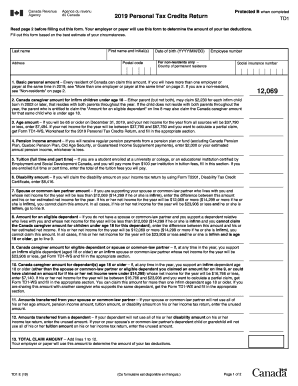
Fill out this form based on the best estimate of your circumstances. Last name Address First name and initial(s) Postal code Date of birth (YYYY/MM/DD) Employee number For non-residents only – Country of permanent residence Social insurance number 1. Basic personal amount – Every resident of Canada can claim this amount. If you will have more than one employer or payer at the same time in 2019, see "More than one employer or payer at the same time" on page 2. If you are a non-reside.
Loading
Open form follow the instructions
Easily sign the form with your finger
Send filled & signed form or save
How to fill out the Canada TD1 E online
Filling out the Canada TD1 E form is an essential task for individuals receiving income in Canada. This guide provides clear instructions to help you complete the form accurately and efficiently, ensuring your tax deductions are correctly calculated by your employer or payer.
Follow the steps to successfully complete the Canada TD1 E form online.
- Click ‘Get Form’ button to obtain the form and open it in the editor.
- Enter your last name, first name, and initial(s) in the designated fields to identify yourself accurately.
- Provide your full address and postal code to ensure your employer or payer has the correct information for correspondence.
- Fill in your date of birth in the YYYY/MM/DD format to confirm your age, which may affect your claims.
- Input your employee number if applicable, as this helps in linking your tax forms to your employment records.
- If you are a non-resident, specify your country of permanent residence in the designated field; otherwise, proceed to the next step.
- Enter your social insurance number to verify your identity and facilitate tax processing.
- Complete the applicable fields related to your tax credits. Read each section carefully and input amounts for personal, caregiver, age, and disability claims as applicable to your situation.
- Calculate your total claim amount by adding the amounts from the relevant fields to ensure your employer can deduct the correct taxes.
- Review all provided information for accuracy. Any errors may lead to issues with your tax deductions.
- Sign and date the form to certify that all information is accurate and complete before submission.
- Submit the completed form to your employer or payer to ensure they can apply the appropriate tax deductions to your remuneration.
Start filling out your Canada TD1 E form online today to ensure accurate tax deductions!
Experience a faster way to fill out and sign forms on the web. Access the most extensive library of templates available.
Related content
A single-center, open-label, exploratory study to assess the tolerability and safety of...
TOTAL CLAIM AMOUNT – Add lines 1 to 10. Your employer or payer will use your claim...
Each TWINDRIVE® TD1 unit consists of 1 - 2 internal motors and a built-in control box...
Get answers to your most pressing questions about US Legal Forms API.
How do you know if you owe taxes or get a refund in Canada?
To determine whether you owe taxes or are eligible for a refund in Canada, you need to review your total income, deductions, and tax credits for the year. File your taxes accurately to identify your total tax liability. Using reliable tax software or services can simplify this process and help you understand your obligations. If you need a better grasp on the Canada TD1 E and its implications, you can explore the resources offered by US Legal Forms.
What is a T4E slip Canada?
A T4E slip in Canada is a document that outlines the employment insurance benefits you received during the tax year along with the taxes that were withheld. This slip is crucial for understanding your financial situation and ensuring you report your earnings accurately. Keeping track of your T4E is vital for your tax filings. For help with tax form management, including the use of the Canada TD1 E form, check out US Legal Forms.
What is the new $7500 tax credit in Canada?
The new $7500 tax credit in Canada is designed to provide financial relief for individuals investing in energy-efficient home improvements. This credit can significantly reduce your tax liabilities when you meet certain criteria and complete necessary applications. Understanding this benefit can help you take advantage of available savings. If you’re looking for guidance on how this tax credit relates to your obligations, including the Canada TD1 E, US Legal Forms can assist you.
Where do I find my T4E on my Service Canada account?
To find your T4E on your Service Canada account, log in to your online account and navigate to the section for tax documents. There you will find your T4E slip, which you can view, save, or print. It’s essential to ensure this information is correct to facilitate a smooth tax filing process. For additional help with forms like the Canada TD1 E, consider exploring solutions available from US Legal Forms.
Who gets a T4 in Canada?
In Canada, a T4 slip is issued to employees who have earned income during the tax year. This slip is provided by employers and outlines total earnings and tax deductions. If you have worked for a Canadian company, you should receive a T4 if your earnings meet set thresholds. For assistance with managing your tax paperwork, including forms like the Canada TD1 E, consider using US Legal Forms.
What is line 15000 on a Canada tax return?
Line 15000 on a Canada tax return is where you report your total income for the year. This figure includes all taxable income from various sources, such as employment, investments, and freelance work. Accurately reporting this amount is crucial for calculating your taxes owed or refund due. If you need help understanding what to include, US Legal Forms provides resources that clarify tax return entries based on the Canada TD1 E.
How do I claim my employment amount in Canada?
To claim your employment amount in Canada, you must complete the appropriate forms on your tax return, specifically using the Canada TD1 E. This form allows you to indicate various employment-related credits, which can reduce your overall tax burden. Make sure to retain any required documentation from your employer to support your claims. For more clarity on this process, US Legal Forms offers easy-to-follow templates and guides.
What is the 90% rule for newcomers to Canada?
The 90% rule allows newcomers to Canada to claim the tax credits they are eligible for. Specifically, it states that if you earn at least 90% of your total income in Canada, you can claim certain deductions. This rule helps ensure that newcomers can benefit from the Canadian tax system while establishing themselves financially. For detailed guidance on claiming tax credits, consider using resources like US Legal Forms for a comprehensive and user-friendly experience.
How do I file for self-employment income in Canada?
Filing for self-employment income in Canada involves preparing your T1 tax return and attaching the T2125 form. This documentation shows your business income and expenses, which are essential for calculating your taxes owed. By correctly following the Canada TD1 E guidelines, you ensure a smooth filing process and reduce the chances of errors.
How do I declare self-employment income?
To declare self-employment income, complete the T2125 form as part of your income tax return, detailing both your income and eligible expenses. This process presents an opportunity to highlight your deductions, which can reduce your taxable income significantly. For clarity on alignment with the Canada TD1 E, refer to the guidelines set by the Canada Revenue Agency.
Use professional pre-built templates to fill in and sign documents online faster. Get access to thousands of forms.
If you believe that this page should be taken down, please follow our DMCA take down process here.
This form is available in several versions. Select the version you need from the drop-down list below.