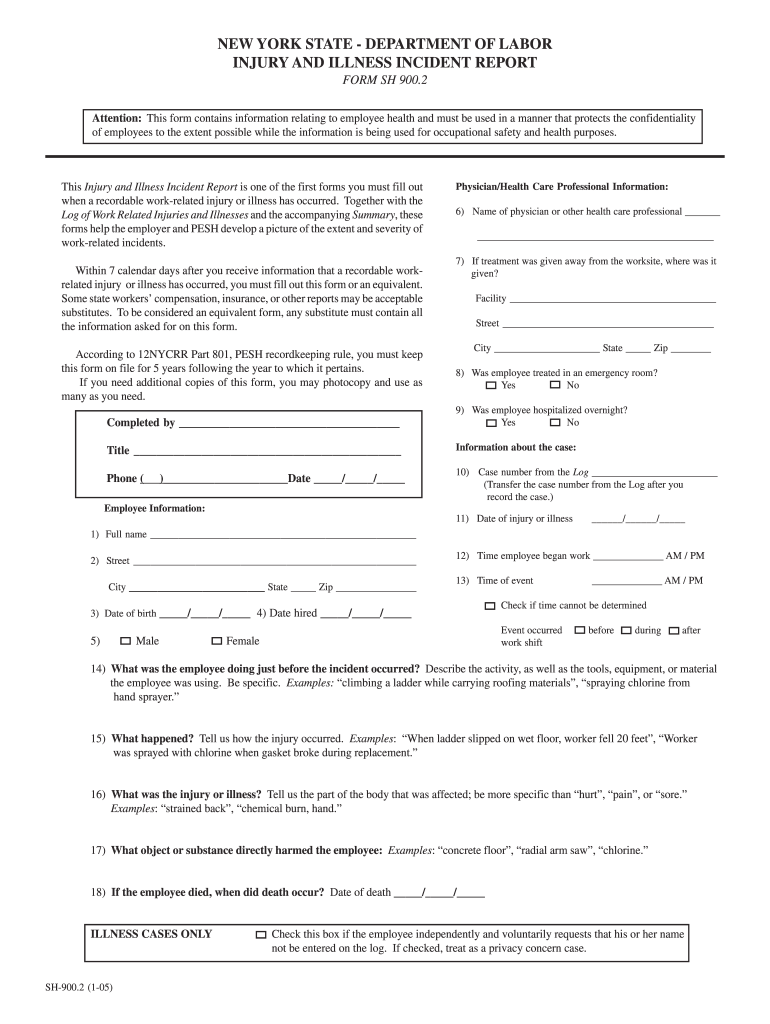
The confidentiality of employees to the extent possible while the information is being used for occupational safety and health purposes. This Injury and Illness Incident Report is one of the first forms you must fill out when a recordable work-related injury or illness has occurred. Together with the Log of Work Related Injuries and Illnesses and the accompanying Summary, these forms help the employer and PESH develop a picture of the extent and severity of work-related incidents. Within 7 cal.
Loading

Open form follow the instructions

Easily sign the form with your finger

Send filled & signed form or save
How to fill out the Sh900 2 online
The Sh900 2 form is an essential document for reporting work-related injuries and illnesses. This guide provides clear and detailed instructions on how to fill out this form online, ensuring that you accurately capture vital information regarding the incident.
Follow the steps to complete the Sh900 2 form online:
- Press the ‘Get Form’ button to access the Sh900 2 form. This will allow you to open the document in the online editor, where you can begin filling it out.
- In the section for physician or health care professional information, provide the name of the physician who treated the employee and indicate where treatment was administered if it was outside the workplace.
- Indicate whether the employee was treated in an emergency room and if they were hospitalized overnight.
- Complete the case number section by transferring the corresponding number from the Log of Work Related Injuries and Illnesses.
- Fill in the employee’s information, including their full name, address, date of birth, and date hired. Make sure to provide accurate details.
- Record the date of the injury or illness and the times associated with the event, including the start of the employee's work shift and the time of the incident.
- Describe the employee's activities prior to the incident, specifying any tools, equipment, or materials they were using.
- Clearly articulate how the injury or illness occurred, providing enough detail for a complete understanding of the events.
- Specify the injury or illness, detailing the affected body part and avoiding vague terms.
- Identify the object or substance that directly caused harm to the employee.
- If applicable, indicate the date of death if the employee died due to the incident and ensure to check the box for privacy concerns if the employee requests confidentiality.
- After completing all sections of the form, review the details for accuracy and ensure all necessary fields are filled in.
- Once you have finished, save the changes, download the completed form, and print or share it as needed.
Complete your Sh900 2 form online today to ensure proper reporting of workplace incidents.
Experience a faster way to fill out and sign forms on the web. Access the most extensive library of templates available.
Related content
2) Street. City. State _____ Zip. 3) Date of birth _____/_____/_____ 4) Date hired...
2) Street. City. State _____ Zip. 3) Date of birth _____/_____/_____ 4) Date hired...
Related Documents · 1) Keep the SH900 within 1 meter range of a Bluetooth®‐ready...
Get answers to your most pressing questions about US Legal Forms API.
How do I contact workers comp in NY?
Contact the WCB Customer Support Unit Email:WCBCustomerSupport@wcb.ny.govTelephone:(844) 337-6305WCB Customer Support Unit Availability:Monday - Friday, 8:30am - 4:30pm
How do I report an injury to Nysif?
When a non-emergency work-related injury occurs, call us at 844.879. 2692 to report the injury and speak to a nurse triage specialist.
How do I report an injury to a New York State employee?
New York State has a system for employees to report work-related injuries and illnesses. The system is called ARS, the Accident Reporting System. Call the ARS toll-free number, 1-888-800-0029, to report a work-related injury or illness 8 a.m. to 5 p.m., Monday through Friday (excluding holidays).
How long does an employee have to report an injury in New York?
Always report your on-the-job injuries to your immediate supervisory as soon as possible after your accident. Workers must report their injuries within 30 days of the accident, ing to New York law. Workers have up to two years to file a claim if an injury has caused other damage.
What is the sh 900?
This form contains information relating to employee health and must be used in a manner that protects the confidentiality of employees to the extent possible while the information is being used for occupational safety and health purposes.
How do I report a workers comp accident in NY?
New York State has a system for employees to report work-related injuries and illnesses. The system is called ARS, the Accident Reporting System. Call the ARS toll-free number, 1-888-800-0029, to report a work-related injury or illness 8 a.m. to 5 p.m., Monday through Friday (excluding holidays).
Use professional pre-built templates to fill in and sign documents online faster. Get access to thousands of forms.
If you believe that this page should be taken down, please follow our DMCA take down process here.