Loading
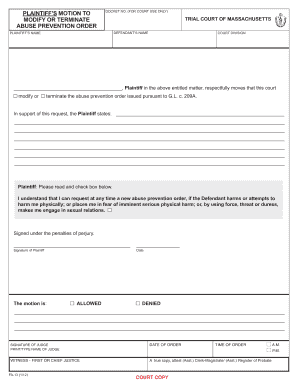
Get Plaintiffs Motion To Modify Or Terminate Abuse Prevention Order Plaintiffs Motion To Change Or End
How it works
-

Open form follow the instructions
-

Easily sign the form with your finger
-

Send filled & signed form or save
How to use or fill out the Plaintiffs Motion To Modify Or Terminate Abuse Prevention Order Plaintiffs Motion To Change Or End online
This guide provides detailed instructions on how to fill out the Plaintiffs Motion To Modify Or Terminate Abuse Prevention Order online. Whether you are seeking to change or terminate an existing order, these clear steps will assist you in completing the form effectively.
Follow the steps to fill out the motion form correctly.
- Click ‘Get Form’ button to obtain the form and open it in the editor.
- Fill in the docket number, which is provided for court use only. This number helps the court identify your case.
- Enter your name in the designated field as the plaintiff. Ensure that you are using your legal name as it appears on official documents.
- Input the defendant's name accurately in the provided field. This should reflect the name as stated on the existing abuse prevention order.
- Select the appropriate court division where you are submitting the motion. This can typically be found in your court paperwork.
- In the section expressing the reason for your motion, clearly state your request to modify or terminate the abuse prevention order. Provide any supporting details or pertinent information related to your situation.
- Read and check the box concerning your awareness of the rights relating to the ability to request a new order if necessary. This is important for your understanding of ongoing protections.
- Sign the document in the space provided for the plaintiff's signature, acknowledging that the information is accurate under penalties of perjury.
- Leave the section for the judge's response blank, as this will be completed by the judge after your motion is reviewed.
- After completing all required fields, review your entries for accuracy. Once satisfied, you can save your changes, download, print, or share the form as needed.
Start your process today by filling out the motion online.
If there is a restraining order against you, but the person who filed the order, the Plaintiff, repeatedly tries to have contact with you, you may go to court to ask the judge to vacate the restraining order, but the Plaintiff cannot violate the restraining order in the same way the as the Defendant.