Loading
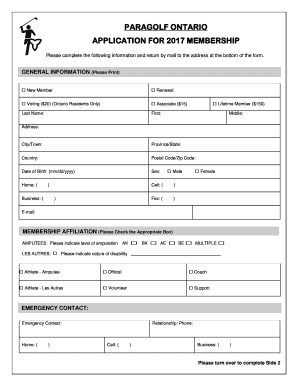
Get Paragolf Ontario Application For 2017 Membership
How it works
-

Open form follow the instructions
-

Easily sign the form with your finger
-

Send filled & signed form or save
How to fill out the PARAGOLF ONTARIO APPLICATION FOR 2017 MEMBERSHIP online
Completing the PARAGOLF ONTARIO application form for 2017 membership online can streamline the process and ensure accurate submission. This guide offers clear instructions to help you navigate each section of the form effectively.
Follow the steps to fill out your application accurately.
- Click ‘Get Form’ button to obtain the form and open it in your selected editing application.
- Complete the general information section. Indicate if you are a new member or a renewing member, and check the appropriate membership category, such as Voting, Associate, or Lifetime Member. Fill in your last name, first name, and middle name.
- Provide your contact information, including your address, city or town, province or state, country, and postal or zip code. Be sure to enter your date of birth in the format mm/dd/yyyy, and provide your sex.
- Fill in your phone numbers for home, cell, and business, along with your email address.
- In the membership affiliation section, indicate your level of amputation if applicable or check the box for 'Les Autres' and specify the nature of your disability. Choose your role, such as athlete, official, coach, volunteer, or support.
- Add an emergency contact's name and provide their phone numbers, specifying the relationship.
- On side two, indicate your sports interests by marking 'A' for actively participating or 'I' for interested in each listed sport. Also, provide your classification if you actively compete in specific sports.
- Read the waiver section thoroughly and provide your signature to indicate agreement. If the athlete is under 18 years of age, a guardian's signature is also required.
- Review your form for accuracy, then save your changes. Finally, you can download, print, or share the completed form as necessary.
Complete your application online today and become a member of ParaGolf Ontario!
Industry-leading security and compliance
US Legal Forms protects your data by complying with industry-specific security standards.
-
In businnes since 199725+ years providing professional legal documents.
-
Accredited businessGuarantees that a business meets BBB accreditation standards in the US and Canada.
-
Secured by BraintreeValidated Level 1 PCI DSS compliant payment gateway that accepts most major credit and debit card brands from across the globe.