Loading
Get Canada Icbc Mv1325 2014
How it works
-

Open form follow the instructions
-

Easily sign the form with your finger
-

Send filled & signed form or save
How to fill out the Canada ICBC MV1325 online
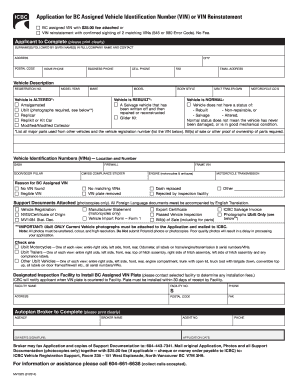
The Canada ICBC MV1325 form is essential for applying for a BC assigned vehicle identification number (VIN) or reinstating an existing VIN. This guide provides a clear, step-by-step process to assist users in completing the form accurately and efficiently online.
Follow the steps to complete the Canada ICBC MV1325 online.
- Press the ‘Get Form’ button to access the form and open it in your chosen editor.
- In the 'Applicant to Complete' section, provide your surname and full given names or the company name. Ensure that all information is printed clearly.
- Fill in your complete address, including the postal code and city.
- Provide your home, business, and cell phone numbers, and include a fax number if applicable.
- Enter your email address in the designated field to ensure you receive updates regarding your application.
- In the 'Vehicle Description' section, enter the registration number, model year, and make of your vehicle.
- Indicate whether your vehicle has been altered by selecting the appropriate category (e.g., amalgamated, Ubilt, etc.), and provide the model and body style.
- If the vehicle has been rebuilt, check the box and describe its status clearly.
- List all major parts used from other vehicles in the designated field, along with their respective vehicle registration numbers.
- For the ‘Vehicle Identification Numbers (VINs)’ section, indicate the location and number of VINs as required.
- In the 'Reason for BC Assigned VIN' section, select the reason that applies to your situation, such as 'No VIN found' or 'Illegible VIN'.
- Attach any necessary support documents, ensuring they are photocopies only, and that any foreign language documents are accompanied by English translations.
- If applicable, check the boxes for the specific types of Ubilt photographs required and ensure you attach these to your application.
- Provide the details of the Designated Inspection Facility where the BC assigned VIN plate will be installed, including the facility name, number, address, and phone.
- In the 'Autoplan Broker to Complete' section, print clearly the agency's name, owner's signature, and the broker's name and agent number.
- Finally, determine if any fees apply and prepare any required payments. Save your changes, and download or print your completed application for submission.
Begin the process of completing your application online today!
Get form
Experience a faster way to fill out and sign forms on the web. Access the most extensive library of templates available.
Reading a VIN number in Canada is straightforward once you know what to look for. The VIN consists of 17 characters representing various vehicle attributes, such as the manufacturer, model, and year of production. You can refer to resources or guides available on websites like the Canada ICBC MV1325 to understand each segment of the VIN. This knowledge helps you verify vehicle details quickly.
Get This Form Now!
Use professional pre-built templates to fill in and sign documents online faster. Get access to thousands of forms.