Loading
Get Xxftx
How it works
-

Open form follow the instructions
-

Easily sign the form with your finger
-

Send filled & signed form or save
How to fill out the Xxftx online
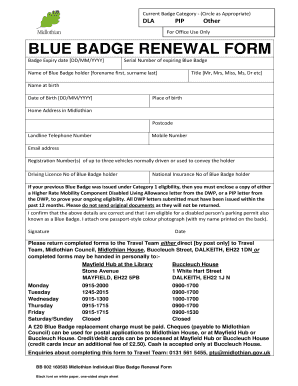
Filling out the Xxftx is a straightforward process that enables you to renew your Blue Badge efficiently. This guide provides step-by-step instructions to help you complete the form accurately and ensure successful submission.
Follow the steps to complete your Xxftx form online.
- Click ‘Get Form’ button to obtain the form and open it in the editor.
- Select the appropriate badge category by circling either DLA, PIP, or other as necessary.
- Fill in the badge expiry date, ensuring it is in the correct format [DD/MM/YYYY].
- Enter the serial number of your expiring Blue Badge.
- Provide the name of the Blue Badge holder, including forename and surname.
- Indicate the title (e.g., Mr, Mrs, Miss) of the Blue Badge holder.
- Input the name at birth of the Blue Badge holder.
- Fill in the date of birth of the Blue Badge holder in the format [DD/MM/YYYY].
- State the place of birth of the Blue Badge holder.
- Provide the home address in Midlothian, including the postcode.
- Enter the landline telephone number.
- Include the mobile number.
- Provide an email address for communication purposes.
- List the registration numbers of up to three vehicles normally driven or used to convey the holder.
- Insert the driving licence number of the Blue Badge holder.
- Enter the National Insurance number of the Blue Badge holder.
- If applicable, attach a copy of the required DWP letter that supports ongoing eligibility.
- Confirm the accuracy of the provided details and eligibility for the Blue Badge by checking the statement.
- Attach one passport-style color photograph with the name printed on the back.
- Sign and date the form to validate your submission.
- Return the completed form either by posting to the Travel Team or hand it in personally at designated locations during specified hours.
- Ensure payment of the £20 Blue Badge replacement charge via the accepted methods.
Complete your Xxftx form online today to ensure your Blue Badge renewal is processed efficiently.