Loading
Form preview
  • US Legal Forms
  • Form Library
  • More Forms
  • More Multi-State Forms
  • Dl 11cd

Get Dl 11cd

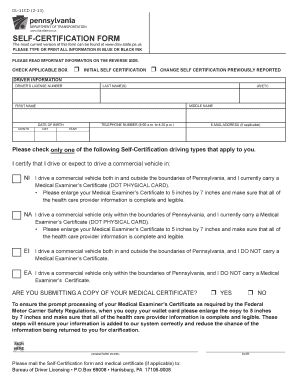
ASE READ IMPORTANT INFORMATION ON THE REVERSE SIDE. CHECK APPLICABLE BOX r INITIAL SELF CERTIFICATION r CHANGE SELF CERTIFICATION PREVIOUSLY REPORTED DRIVER INFORMATION DRIVER S LICENSE NUMBER LAST NAME(S) MIDDLE NAME FIRST NAME MONTH JR/ETC DATE OF BIRTH DAY YEAR TELEPHONE NUMBER (8:00 a.m. to 4:30 p.m.) E-MAIL ADDRESS (if applicable) Please check only one of the following Self-Certification driving types that apply to you. I certify that I drive or expect to drive a comme.

How it works

  1. Open form

    Open form follow the instructions

  2. Easily sign form

    Easily sign the form with your finger

  3. Share form

    Send filled & signed form or save

How to fill out the Dl 11cd online

Filling out the Dl 11cd form online can streamline the self-certification process for drivers of commercial vehicles. This guide will provide a clear step-by-step approach to ensure you complete the form accurately and efficiently.

Follow the steps to fill out the Dl 11cd form correctly.

  1. Use the ‘Get Form’ button to obtain the self-certification form and open it in your preferred editor.
  2. Begin by checking the appropriate box to indicate whether this is your initial self-certification or a change to a previously reported self-certification.
  3. Enter your driver information, including your driver's license number, last name, middle name, first name, date of birth, telephone number, and email address if applicable. Ensure that all information is legible and accurate.
  4. Select your self-certification driving type by checking the box that applies to you. Make sure to review the descriptions of each driving type (NI, NA, EI, EA) before making your selection.
  5. Indicate whether you are submitting a copy of your medical certificate by checking 'Yes' or 'No'. If 'Yes', ensure you have the certificate ready to submit with this form.
  6. Sign the form in the designated area using black or blue ink, ensuring that your signature is clear.
  7. Complete the date field to confirm when the form is being submitted.
  8. Once all fields are complete, save any changes made to the form. You may download, print, or share the form for submission.

Complete your self-certification process online to ensure timely and accurate processing of your information.

Get form

Experience a faster way to fill out and sign forms on the web. Access the most extensive library of templates available.
Get form

Related content

Self-Certification / Medical Examiner's...
Commercial drivers are required to certify using PennDOT's Self-Certification Form...
Learn more
Driver License Louisiana Book | English as a...
Records 601 - 987 — Process: Step 1: Acquire a Commercial Learner's Permit Application...
Learn more
2011 Nissan Altima Owner's Manual - Dealer E...
DVD±R DL). ○ Rewritable compact discs. (DVD±RW, DVD±RW DL). ○ Do not use the...
Learn more

Related links form

What I Love About You Pdf 1900 Capitol Avenue Church Of God Exhorter Study Guide Sample Reconsideration Of Value Letter

Questions & Answers

Get answers to your most pressing questions about US Legal Forms API.

Contact support

Nearly every commercial driver, unless the type of commerce you drive qualifies as 'Excepted', is required to submit their valid Medical Examiner's Certificate to PennDOT. You must meet the Federal DOT medical certificate requirements. You must meet Pennsylvania requirements under Title 67, Chapter 231.

If you select either the “EA” or “EI” box, you will be able to keep your CDL without submitting a current medical card. If/When you return to driving a commercial vehicle and you need to carry a medical card, you must resubmit a DL-11CD, Self-Certification Form, along with a copy of your valid medical card.

California law requires all CDL drivers to meet Federal Motor Carrier qualification requirements under 49 CFR part 391 and have a valid DOT medical card.

All CDL holders must submit a self-certification in order to be issued and maintain their CDL. All Ohio CDL holders are required to certify the type of commercial operation they're engaged in. You must meet the Federal DOT medical certificate requirements.

After CDL Downgrade The most common reason to have your CDL downgraded is failure to submit an updated medical certificate, and remedying that situation is usually as simple as having a medical examination and submitting the certificate to reinstate your CDL.

You must submit proof that you are medically qualified every time you apply for a CLP, CDL, upgrade your CDL license, renew your CDL license, change your address, or request a duplicate CDL.

If it expires within the next 60 days you should renew it, and get it updated with PennDOT before it expires. Approximately 90 days prior to the expiration date of your medical certificate, PennDOT will mail you a reminder letter.

12. Who must submit a Medical Examiner's Certificate (DOT Physical Card)? Nearly every commercial driver, with limited exception, is required to submit their valid Medical Examiner's Certificate (DOT Physical Card) to PennDOT.

Get This Form Now!

Use professional pre-built templates to fill in and sign documents online faster. Get access to thousands of forms.
Get form
If you believe that this page should be taken down, please follow our DMCA take down processhere.

Industry-leading security and compliance

US Legal Forms protects your data by complying with industry-specific security standards.
  • In businnes since 1997
    25+ years providing professional legal documents.
  • Accredited business
    Guarantees that a business meets BBB accreditation standards in the US and Canada.
  • Secured by Braintree
    Validated Level 1 PCI DSS compliant payment gateway that accepts most major credit and debit card brands from across the globe.
Get Dl 11cd
Get form
  • Adoption
  • Bankruptcy
  • Contractors
  • Divorce
  • Home Sales
  • Employment
  • Identity Theft
  • Incorporation
  • Landlord Tenant
  • Living Trust
  • Name Change
  • Personal Planning
  • Small Business
  • Wills & Estates
  • Packages A-Z
  • Affidavits
  • Bankruptcy
  • Bill of Sale
  • Corporate - LLC
  • Divorce
  • Employment
  • Identity Theft
  • Internet Technology
  • Landlord Tenant
  • Living Wills
  • Name Change
  • Power of Attorney
  • Real Estate
  • Small Estates
  • Wills
  • All Forms
  • Forms A-Z
  • Form Library
  • Legal Hub
  • About Us
  • Help Portal
  • Legal Resources
  • Blog
  • Affiliates
  • Contact Us
  • Delete My Account
  • Site Map
  • Industries
  • Forms in Spanish
  • Localized Forms
  • State-specific Forms
  • Forms Kit
  • Real Estate Handbook
  • All Guides
  • Notarize
  • Incorporation services
  • For Consumers
  • For Small Business
  • For Attorneys
  • USLegal
  • FormsPass
  • pdfFiller
  • signNow
  • altaFlow
  • DocHub
  • Instapage
Form Packages
  • Adoption
  • Bankruptcy
  • Contractors
  • Divorce
  • Home Sales
  • Employment
  • Identity Theft
  • Incorporation
  • Landlord Tenant
  • Living Trust
  • Name Change
  • Personal Planning
  • Small Business
  • Wills & Estates
  • Packages A-Z
Form Categories
  • Affidavits
  • Bankruptcy
  • Bill of Sale
  • Corporate - LLC
  • Divorce
  • Employment
  • Identity Theft
  • Internet Technology
  • Landlord Tenant
  • Living Wills
  • Name Change
  • Power of Attorney
  • Real Estate
  • Small Estates
  • Wills
  • All Forms
  • Forms A-Z
  • Form Library
Customer Service
  • Legal Hub
  • About Us
  • Help Portal
  • Legal Resources
  • Blog
  • Affiliates
  • Contact Us
  • Delete My Account
  • Site Map
  • Industries
  • Forms in Spanish
  • Localized Forms
  • State-specific Forms
  • Forms Kit
Legal Guides
  • Real Estate Handbook
  • All Guides
Prepared for you
  • Notarize
  • Incorporation services
Our Customers
  • For Consumers
  • For Small Business
  • For Attorneys
Our Sites
  • USLegal
  • FormsPass
  • pdfFiller
  • signNow
  • altaFlow
  • DocHub
  • Instapage
Social Media
Call us now toll free:
+1 833 426 79 33
As seen in:
© Copyright 1999-2026 airSlate Legal Forms, Inc. 3720 Flowood Dr, Flowood, Mississippi 39232
  • Your Privacy Choices
  • Terms of Service
  • Privacy Notice
  • Content Takedown Policy
  • Bug Bounty Program