Loading
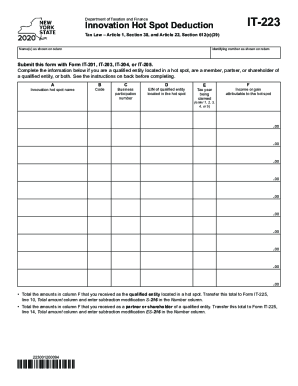
Get Ny Dtf It-223 2020
How it works
-

Open form follow the instructions
-

Easily sign the form with your finger
-

Send filled & signed form or save
How to fill out the NY DTF IT-223 online
Completing the NY DTF IT-223 form online can seem daunting, but with clear guidance, you can navigate the process with ease. This guide provides step-by-step instructions to help you accurately fill out the form and ensure you receive the appropriate tax benefits related to innovation hot spots.
Follow the steps to complete your NY DTF IT-223 form.
- Press the ‘Get Form’ button to access the NY DTF IT-223 form and open it in your editing application.
- Enter your name(s) as shown on your tax return in the designated field.
- Input your identifying number as displayed on your return in the appropriate section.
- Indicate the name of the innovation hot spot as per your certificate letter in Column A.
- Fill in the hot spot identification code obtained from your certificate letter in Column B.
- Record the business participation number from your certificate letter in Column C.
- Enter the employer identification number (EIN) of the certified qualified entity in Column D.
- Select the tax year you are claiming the deduction for by entering the corresponding number (1, 2, 3, 4, or 5) in Column E.
- In Column F, input the income or gain attributable to the hot spot that was included in your recomputed federal adjusted gross income.
- Total the amounts noted in Column F. If you are a qualified entity located in a hot spot, transfer this total to Form IT-225, line 10. If you are a partner or shareholder of a qualified entity, transfer it to Form IT-225, line 14.
- Review all entries for accuracy and completeness before saving your changes.
- You can now download, print, or share the completed form as needed.
Start filling out your NY DTF IT-223 form online today to take advantage of your eligible tax benefits.
Get form
Experience a faster way to fill out and sign forms on the web. Access the most extensive library of templates available.
Get This Form Now!
Use professional pre-built templates to fill in and sign documents online faster. Get access to thousands of forms.