Loading
Form preview
  • US Legal Forms
  • Other Templates
  • Foreign Forms
  • Foreign Australia Other Forms
  • Au Duties Form 62 - Victoria 2015

Get Au Duties Form 62 - Victoria 2015-2026

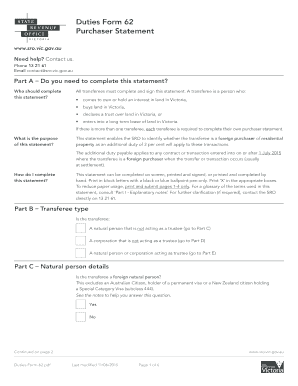
Sferees must complete and sign this statement. A transferee is a person who: • comes to own or hold an interest in land in Victoria, • buys land in Victoria, • declares a trust over land in Victoria, or • enters into a long term lease of land in Victoria. If there is more than one transferee, each transferee is required to complete their own purchaser statement. What is the purpose of this statement? This statement enables the SRO to identify whether the transferee is a foreign pur.

How it works

  1. Open form

    Open form follow the instructions

  2. Easily sign form

    Easily sign the form with your finger

  3. Share form

    Send filled & signed form or save

How to fill out the AU Duties Form 62 - Victoria online

The AU Duties Form 62 is essential for all transferees who wish to acquire an interest in land in Victoria. This comprehensive guide will assist users in completing the form accurately and efficiently, ensuring a smooth process.

Follow the steps to complete the AU Duties Form 62 accurately.

  1. Click ‘Get Form’ button to obtain the AU Duties Form 62 and open it in your preferred document editor.
  2. Complete Part A by confirming whether you need to fill out the purchaser statement. Ensure you understand the transferee definition.
  3. In Part B, identify the type of transferee: natural person, corporation, or trustee. Select the appropriate option to proceed.
  4. If the transferee is a natural person, proceed to Part C. Fill in all requested details, including name, postal address, date of birth, and citizenship information.
  5. For corporations, go to Part D and provide details such as the corporate name, position of the authorized officer, and incorporation country.
  6. If acting as a trustee, complete Part E by providing information about the trust, including the name of the trust and trustee contact details.
  7. In Part F, indicate whether the property is residential. Fill in the property address and any title particulars required.
  8. Proceed to Part G to confirm the accuracy of information provided. Sign and date the form as required to acknowledge the correctness.
  9. Review the Privacy statement in Part H carefully to understand how your information will be used.
  10. Finally, choose to save changes, download, print, or share the completed form as necessary.

Complete your AU Duties Form 62 online for a streamlined process.

Get form

Experience a faster way to fill out and sign forms on the web. Access the most extensive library of templates available.
Get form

Related content

The Government of the United States of America ...
Feb 1, 2015 — satisfy the requirements of Chapter Rule 1 for Chapter 62. 6201.19. A...
Learn more
Evaluation of Driver Testing and Licensing in...
This study is a preliminary investigation of the nature of on-road testing and its...
Learn more
2016 Publication 535
Jan 19, 2017 — This publication discusses common business expenses and explains what is...
Learn more

Related links form

Truck Specs - Trans-Border Global Freight Golden Lions Rugby Academy Application Form Ratio Word Problems Auracle 2120 Owners Manual

Questions & Answers

Get answers to your most pressing questions about US Legal Forms API.

Contact support

A digital duties form in Victoria allows property buyers and sellers to complete and submit their duties online. This method simplifies the process and reduces paperwork, making it more efficient. By using the AU Duties Form 62 - Victoria digitally, you can save time and ensure accuracy in your submission.

There are specific exemptions and concessions available that can reduce or eliminate stamp duty in Victoria. For instance, first-time home buyers may qualify for various grants and exemptions. It's advisable to explore these options and consult a tax professional when preparing your AU Duties Form 62 - Victoria to ensure you are taking advantage of every opportunity.

The stamp duty on a $700,000 house in Victoria typically ranges around $38,500, though this amount can vary based on factors such as first-time home buyer concessions. Calculating the exact duty requires accurate completion of the AU Duties Form 62 - Victoria. Using an online calculator can help, but ensure you complete the form properly to avoid any issues. Platforms like uslegalforms can guide you through this process seamlessly.

The Duties Act in Victoria governs the imposition of duties like stamp duty on various transactions including property transfers. It outlines the responsibilities of taxpayers and provides guidelines for calculating duties owed. If you are navigating property transactions, understanding this act is crucial, and using the AU Duties Form 62 - Victoria can simplify your compliance with its requirements.

Get This Form Now!

Use professional pre-built templates to fill in and sign documents online faster. Get access to thousands of forms.
Get form
If you believe that this page should be taken down, please follow our DMCA take down processhere.
Get AU Duties Form 62 - Victoria
Get form
  • Adoption
  • Bankruptcy
  • Contractors
  • Divorce
  • Home Sales
  • Employment
  • Identity Theft
  • Incorporation
  • Landlord Tenant
  • Living Trust
  • Name Change
  • Personal Planning
  • Small Business
  • Wills & Estates
  • Packages A-Z
  • Affidavits
  • Bankruptcy
  • Bill of Sale
  • Corporate - LLC
  • Divorce
  • Employment
  • Identity Theft
  • Internet Technology
  • Landlord Tenant
  • Living Wills
  • Name Change
  • Power of Attorney
  • Real Estate
  • Small Estates
  • Wills
  • All Forms
  • Forms A-Z
  • Other Templates
  • Legal Hub
  • About Us
  • Help Portal
  • Legal Resources
  • Blog
  • Affiliates
  • Contact Us
  • Delete My Account
  • Site Map
  • Industries
  • Forms in Spanish
  • Localized Forms
  • State-specific Forms
  • Forms Kit
  • Real Estate Handbook
  • All Guides
  • Notarize
  • Incorporation services
  • For Consumers
  • For Small Business
  • For Attorneys
  • USLegal
  • FormsPass
  • pdfFiller
  • signNow
  • altaFlow
  • DocHub
  • Instapage
Form Packages
  • Adoption
  • Bankruptcy
  • Contractors
  • Divorce
  • Home Sales
  • Employment
  • Identity Theft
  • Incorporation
  • Landlord Tenant
  • Living Trust
  • Name Change
  • Personal Planning
  • Small Business
  • Wills & Estates
  • Packages A-Z
Form Categories
  • Affidavits
  • Bankruptcy
  • Bill of Sale
  • Corporate - LLC
  • Divorce
  • Employment
  • Identity Theft
  • Internet Technology
  • Landlord Tenant
  • Living Wills
  • Name Change
  • Power of Attorney
  • Real Estate
  • Small Estates
  • Wills
  • All Forms
  • Forms A-Z
  • Other Templates
Customer Service
  • Legal Hub
  • About Us
  • Help Portal
  • Legal Resources
  • Blog
  • Affiliates
  • Contact Us
  • Delete My Account
  • Site Map
  • Industries
  • Forms in Spanish
  • Localized Forms
  • State-specific Forms
  • Forms Kit
Legal Guides
  • Real Estate Handbook
  • All Guides
Prepared for you
  • Notarize
  • Incorporation services
Our Customers
  • For Consumers
  • For Small Business
  • For Attorneys
Our Sites
  • USLegal
  • FormsPass
  • pdfFiller
  • signNow
  • altaFlow
  • DocHub
  • Instapage
Social Media
Call us now toll free:
+1 833 426 79 33
As seen in:
© Copyright 1999-2026 airSlate Legal Forms, Inc. 17 Station Street, Ste. 203, Brookline, MA 02445
  • Your Privacy Choices
  • Terms of Service
  • Privacy Notice
  • Content Takedown Policy
  • Bug Bounty Program