Loading
Get Ca Tailgate/toolbox Topics 2015-2026
How it works
-

Open form follow the instructions
-

Easily sign the form with your finger
-

Send filled & signed form or save
How to fill out the CA Tailgate/Toolbox Topics online
Filling out the CA Tailgate/Toolbox Topics form is essential for tracking safety meetings and ensuring compliance with workplace safety standards. This guide provides clear instructions to help users navigate the process effectively.
Follow the steps to complete the CA Tailgate/Toolbox Topics form.
- Click ‘Get Form’ button to obtain the form and open it for editing.
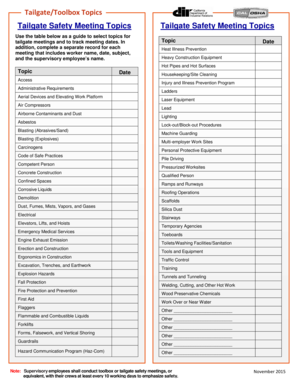
- Review the list of Tailgate Safety Meeting Topics table provided in the form. This table includes various topics such as heat illness prevention, heavy construction equipment, and personal protective equipment.
- Select a relevant topic from the list for your meeting by marking it appropriately in the form.
- Enter the date of the meeting in the designated field next to the selected topic.
- Complete a separate record for each meeting. In this record, include the name of each worker present at the meeting along with the date and subject matter discussed.
- Ensure that the name of the supervisory employee conducting the meeting is documented as required.
- Once all necessary information has been recorded, you can save changes, download the form, print it, or share it with relevant parties.
Complete your CA Tailgate/Toolbox Topics form online today to enhance workplace safety!
Here's how you can make sure your safety toolbox talks stay interesting. Give safety talks first. ... Keep safety talks short. ... Make your toolbox talks relevant. ... Content is crucial. ... Give your talk a purpose. ... Plan your talk. ... Deliver with confidence. ... Choose your format.