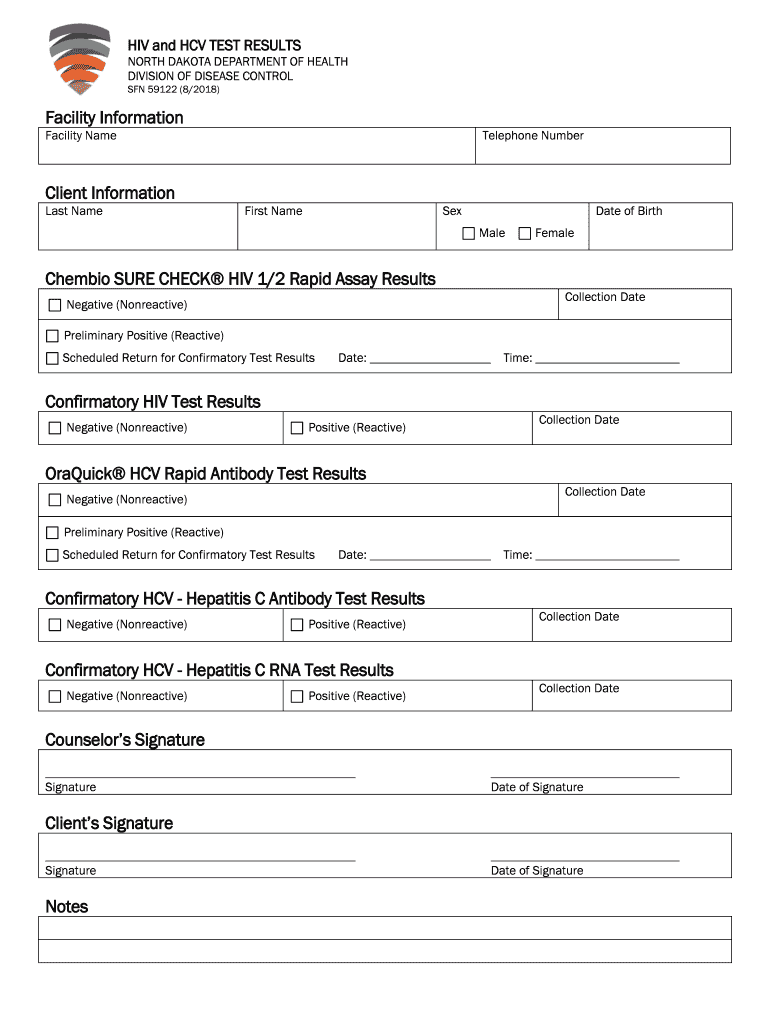
HIV and HCV TEST RESULTS NORTH DAKOTA DEPARTMENT OF HEALTH DIVISION OF DISEASE CONTROL SFN 59122 (8/2018)Facility Information Facility NameTelephone NumberClient Information Last NameFirst NameSexDate.
Loading

Open form follow the instructions

Easily sign the form with your finger

Send filled & signed form or save
How to fill out the ND Form SFN 59122 online
Completing the ND Form SFN 59122 online is a straightforward process designed to collect essential information regarding HIV and HCV test results. This guide will provide you with a detailed, step-by-step approach to ensure accurate completion of the form.
Follow the steps to fill out the ND Form SFN 59122 online
- Click ‘Get Form’ button to obtain the form and open it in the editor.
- Enter the facility information by providing the facility name and telephone number in the designated fields.
- Complete the client information section, including the client's last name, first name, sex, and date of birth. Make sure to select the correct option for male or female.
- Fill out the Chembio SURE CHECK® HIV 1/2 rapid assay results by entering the collection date and selecting the result status as either negative (nonreactive) or preliminary positive (reactive). If needed, indicate the scheduled return for confirmatory test results by providing the date and time.
- Complete the confirmatory HIV test results section, documenting if the results are negative (nonreactive) or positive (reactive) along with the collection date.
- For the OraQuick® HCV rapid antibody test results, input the collection date and the result status as negative (nonreactive) or preliminary positive (reactive). If applicable, provide the scheduled return date and time for confirmatory test results.
- Fill in the confirmatory HCV results sections, detailing the results as negative (nonreactive) or positive (reactive) alongside the collection dates where necessary.
- Document the confirmatory HCV - Hepatitis C RNA test results status and the collection date.
- Securely sign and date the counselor's signature field, followed by the client's signature and date.
- Utilize the notes section for any additional comments before finalizing the form.
- After completing all sections, save your changes. You can also download, print, or share the completed form as needed.
Begin filling out the ND Form SFN 59122 online now to ensure accurate submission.
Experience a faster way to fill out and sign forms on the web. Access the most extensive library of templates available.
Related content
by KM Holmström · Cited by 200 — In most cells, the mitochondria and NADPH oxidase are...
the 23135932950 1 of 13151960974 2 and 12997686891 3 to 12137015015 4 a ... 201884350 371...
Get answers to your most pressing questions about US Legal Forms API.
How do I file for a lost title in North Dakota?
I've lost or mutilated my title, how do I get a replacement? The registered owner or legal owner must complete SFN 2872 Application for Certificate of Title and Registration with the vehicle information. A reason for the duplicate must be stated on the application.
What is a power of attorney for a car in North Dakota?
A North Dakota vehicle power of attorney form is utilized to convey a vehicle owner's authority to make decisions related to the vehicle to an agent. This paperwork will entitle the agent to manage issues involving motor vehicles in North Dakota.
What do I need to bring to register my car in North Dakota?
Vehicle registration in ND must be done in person at a local DOT office. Residents need to bring their title, driver's license, and payment for the registration fee. New residents follow the same processes. Non-residents working in North Dakota are able to obtain a temporary registration.
How much does it cost to transfer a title in North Dakota?
How Much Does a Title Transfer Cost in North Dakota? The North Dakota DOT requires drivers in this state to pay a $5 vehicle title transfer fee when they transfer ownership of a motor vehicle.
Can a non resident register a vehicle in North Dakota?
This system is for purchasing temporary motor vehicle registration. Nonresidents gainfully employed in this state and driving vehicles that are not registered with the state of North Dakota are subject to temporary registration for a minimum of 6 months.
What do you need to transfer a title in North Dakota?
What You'll Need to Transfer your Vehicle Title in North Dakota Complete the Application for Certificate of Title and Registration of a Vehicle. Complete the Damage/Salvage Disclosure Statement for cars 9 years old or less. Proof of insurance. A lien release from the seller. A valid driver's license.
How much are vehicle title fees in North Dakota?
The North Dakota DMV charges the following fees: Car Registration Fee: $49 to $274 per year. Title Fee: $5.
How much is title and registration in North Dakota?
TITLEDUPLICATE$8.00CORRECTION$10.00TITLE TRANSFER & REGISTRATION$12.00NEW TITLE & REGISTRATION$12.0029 more rows
Does North Dakota require a bill of sale to transfer title?
The state does not require sellers to complete a bill of sale. However, the buyer will need to carry either a bill of sale or dated copy of the title certificate in the car until they complete the registration process.
Use professional pre-built templates to fill in and sign documents online faster. Get access to thousands of forms.
If you believe that this page should be taken down, please follow our DMCA take down process here.