Loading
Form preview
  • US Legal Forms
  • Other Templates
  • Foreign Forms
  • Foreign Canada Tax Forms
  • Canada Td1bc E - British Columbia 2020

Get Canada Td1bc E - British Columbia 2020-2026

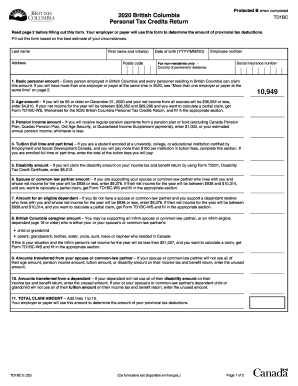
Protected B when completed2020 British Columbia Personal Tax Credits ReturnTD1BCRead page 2 before filling out this form. Your employer or payer will use this form to determine the amount of provincial.

How it works

  1. Open form

    Open form follow the instructions

  2. Easily sign form

    Easily sign the form with your finger

  3. Share form

    Send filled & signed form or save

How to fill out the Canada TD1BC E - British Columbia online

Navigating the completion of the Canada TD1BC E - British Columbia form can be straightforward with the right guidance. This user-friendly guide will help you understand each section of the form and provide clear instructions for filling it out correctly.

Follow the steps to complete the form with confidence.

  1. Click ‘Get Form’ button to access the Canada TD1BC E - British Columbia form and open it in your preferred online editing tool.
  2. Begin by entering your last name, first name and initials, address, postal code, date of birth (formatted as YYYY/MM/DD), employee number, and social insurance number in the designated fields.
  3. For non-residents, provide your country of permanent residence in the appropriate section.
  4. Proceed to the Basic Personal Amount section. This amount is claimable by every person employed in British Columbia. Indicate your eligibility based on your employment status.
  5. Complete the Age Amount section if you are 65 or older before the end of the year and meet the income criteria. Specify the amount based on your estimated net income.
  6. In the Pension Income Amount field, enter either $1,000 or your estimated annual pension income, ensuring it aligns with the specified criteria.
  7. For the Tuition section, input the total tuition fees if you are enrolled as a student and pay more than $100 in fees at qualified institutions.
  8. If applicable, claim the Disability Amount by confirming your eligibility through Form T2201 and entering the specified amount.
  9. Indicate any amounts for your spouse or common-law partner if you support them and they fall under the specified income limits.
  10. Next, provide any amounts transferred from dependents or partners, ensuring to follow the guidelines for amounts not utilized in their tax returns.
  11. Calculate your Total Claim Amount by adding all amounts from lines 1 to 10, which your employer or payer will use for provincial tax deductions.
  12. Finally, certify the accuracy of the provided information by signing, dating the form, and completing the process by submitting it to your employer or payer.

Complete your Canada TD1BC E - British Columbia online today to ensure accurate tax deductions!

Get form

Experience a faster way to fill out and sign forms on the web. Access the most extensive library of templates available.
Get form

Related content

(PDF) Implementation Guide Onboarding Configuring...
224 How to Add or Edit the E-Mail Notification Text. ... Compliance Forms [page 271] ance...
Learn more

Related links form

DC Provisional ABA Approved Law School Certification DC Uniform Bar Exam Information 2018 DC USCA 72 2014 DC Verification and Certificate of Notice by Personal Representative 2014

Get This Form Now!

Use professional pre-built templates to fill in and sign documents online faster. Get access to thousands of forms.
Get form
If you believe that this page should be taken down, please follow our DMCA take down processhere.
Get Canada TD1BC E - British Columbia
Get form
  • Adoption
  • Bankruptcy
  • Contractors
  • Divorce
  • Home Sales
  • Employment
  • Identity Theft
  • Incorporation
  • Landlord Tenant
  • Living Trust
  • Name Change
  • Personal Planning
  • Small Business
  • Wills & Estates
  • Packages A-Z
  • Affidavits
  • Bankruptcy
  • Bill of Sale
  • Corporate - LLC
  • Divorce
  • Employment
  • Identity Theft
  • Internet Technology
  • Landlord Tenant
  • Living Wills
  • Name Change
  • Power of Attorney
  • Real Estate
  • Small Estates
  • Wills
  • All Forms
  • Forms A-Z
  • Other Templates
  • Legal Hub
  • About Us
  • Help Portal
  • Legal Resources
  • Blog
  • Affiliates
  • Contact Us
  • Delete My Account
  • Site Map
  • Industries
  • Forms in Spanish
  • Localized Forms
  • State-specific Forms
  • Forms Kit
  • Real Estate Handbook
  • All Guides
  • Notarize
  • Incorporation services
  • For Consumers
  • For Small Business
  • For Attorneys
  • USLegal
  • FormsPass
  • pdfFiller
  • signNow
  • altaFlow
  • DocHub
  • Instapage
Form Packages
  • Adoption
  • Bankruptcy
  • Contractors
  • Divorce
  • Home Sales
  • Employment
  • Identity Theft
  • Incorporation
  • Landlord Tenant
  • Living Trust
  • Name Change
  • Personal Planning
  • Small Business
  • Wills & Estates
  • Packages A-Z
Form Categories
  • Affidavits
  • Bankruptcy
  • Bill of Sale
  • Corporate - LLC
  • Divorce
  • Employment
  • Identity Theft
  • Internet Technology
  • Landlord Tenant
  • Living Wills
  • Name Change
  • Power of Attorney
  • Real Estate
  • Small Estates
  • Wills
  • All Forms
  • Forms A-Z
  • Other Templates
Customer Service
  • Legal Hub
  • About Us
  • Help Portal
  • Legal Resources
  • Blog
  • Affiliates
  • Contact Us
  • Delete My Account
  • Site Map
  • Industries
  • Forms in Spanish
  • Localized Forms
  • State-specific Forms
  • Forms Kit
Legal Guides
  • Real Estate Handbook
  • All Guides
Prepared for you
  • Notarize
  • Incorporation services
Our Customers
  • For Consumers
  • For Small Business
  • For Attorneys
Our Sites
  • USLegal
  • FormsPass
  • pdfFiller
  • signNow
  • altaFlow
  • DocHub
  • Instapage
Social Media
Call us now toll free:
+1 833 426 79 33
As seen in:
© Copyright 1999-2026 airSlate Legal Forms, Inc. 17 Station Street, Suite 303, Brookline, MA 02445
  • Your Privacy Choices
  • Terms of Service
  • Privacy Notice
  • Content Takedown Policy
  • Bug Bounty Program