Loading
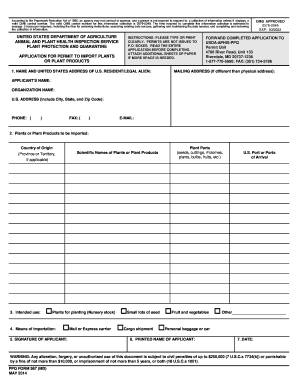
Get Usda Ppq 587 2014-2026
How it works
-

Open form follow the instructions
-

Easily sign the form with your finger
-

Send filled & signed form or save
How to fill out the USDA PPQ 587 online
Filling out the USDA PPQ 587 form is an essential step when importing plants or plant products into the United States. This guide provides step-by-step instructions to help users complete the form accurately and efficiently online.
Follow the steps to complete the USDA PPQ 587 form online.
- Click ‘Get Form’ button to obtain the form and open it in the editor.
- Enter the name and address of the person responsible for the importation in the designated fields. Make sure the applicant is a United States resident, and provide an organization name if applicable. Include a physical address along with a mailing address if different. Don't forget to add a daytime phone number, fax number, and email address if available.
- For the section on plants or plant products to be imported, list the countries of origin in the first column, ensuring to include specific states or provinces where applicable. In the second column, enter the scientific names of each plant or plant product. If uncertain about the scientific names, contact the exporter for assistance. In the third column, specify the type of plant parts you plan to import, and in the fourth column, enter the preferred U.S. port of arrival.
- Indicate your intended use of the plants by checking the appropriate box, such as 'Plants for planting,' 'Small lots of seed,' 'Fruits and vegetables,' or 'Other.' If using 'Other,' provide additional details. Be aware of special instructions if importing under the small lots of seed program.
- Select the means of importation by checking the applicable box, whether through mail, cargo shipment, or personal baggage.
- The applicant must sign the form in the designated signature field.
- Print the name of the applicant who signed the form.
- Record the date when the form is completed and signed.
- If additional sheets are required, ensure each page includes the applicant's name and company name at the top.
- After completing all fields, save your changes, and download the form if necessary. You can also print or share the completed document as needed.
Complete your USDA PPQ 587 form online today.