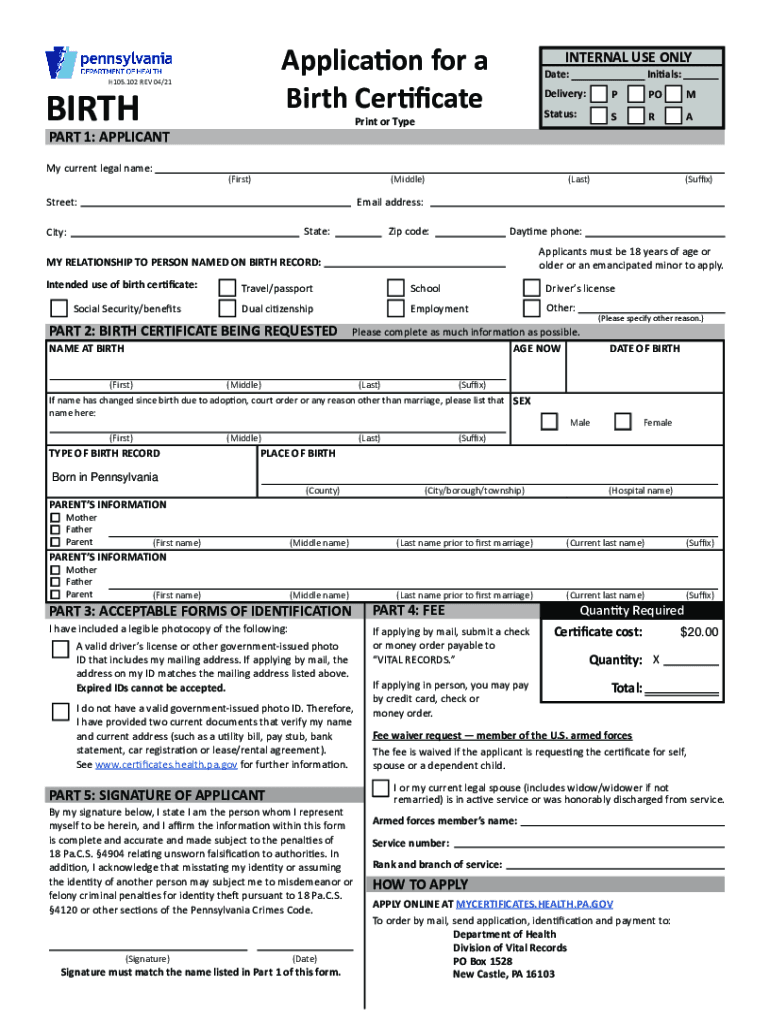
Application for a Birth Certificate H105. 102 REV 06/18 BIRTH INTERNAL USE ONLY Initials Date Delivery Print or Type P PO M S R A PART 1 APPLICANT My current legal name First Middle Street Last Suffix Email address City Zip code State Daytime phone Applicants must be 18 years of age or older or an emancipated minor to apply. MY RELATIONSHIP TO PERSON NAMED ON BIRTH RECORD Intended use of birth certificate Social Security/benefits Travel/passport School Driver s license Dual citizenship Employment Other PART 2 BIRTH CERTIFICATE BEING REQUESTED Please complete as much information as possible. Please specify other reason. AGE NOW NAME AT BIRTH If name has changed since birth due to adoption court order or any reason other than marriage please list that name here TYPE OF BIRTH RECORD DATE OF BIRTH SEX Male Female PLACE OF BIRTH Born in Pennsylvania City/borough/township County Hospital name PARENT/MOTHER S NAME Last name prior to first marriage Current last PART 3 ACCEPTABLE FORMS OF IDENT....
Loading

Open form follow the instructions

Easily sign the form with your finger

Send filled & signed form or save
How to fill out the PA H105.102 online
The PA H105.102 form is essential for individuals seeking to request a birth certificate in Pennsylvania. This guide provides comprehensive steps to complete the form online effectively, ensuring that users understand each section's requirements clearly.
Follow the steps to successfully complete the PA H105.102 form online.
- Press the ‘Get Form’ button to access the form and open it for online completion.
- In Part 1, enter your information as the applicant. Include your current legal name, address, email, and phone number. Ensure all fields are filled accurately.
- Proceed to Part 2. Here, fill out details about the birth certificate you are requesting, including the name at birth, age now, date of birth, sex, place of birth, and the relationship you have to the person named on the birth record.
- In Part 3, specify your acceptable forms of identification. Include details about your valid government-issued photo ID or the alternative documents you are providing if you do not have an ID.
- Next, address Part 4 reflecting on any fees. If applicable, acknowledge that you will submit the required fee payment with your application.
- Finish with Part 5. Sign and date the form, ensuring your signature matches the name listed earlier in Part 1.
- Once all sections are completed, review your entries for accuracy. Save your changes, download, or print the form for your records.
- Finally, submit the completed form online according to the instructions provided, or prepare it for mailing if that is your chosen method.
Complete your PA H105.102 form online today for a streamlined application process!
Experience a faster way to fill out and sign forms on the web. Access the most extensive library of templates available.
Related content
Forms. Click on the form name to access the applicable form. Mail a completed copy to the...
Get answers to your most pressing questions about US Legal Forms API.
How do you add a father's name to a birth certificate in PA?
If you completed the AOP at time of your child's birth but the birth certificate does not list the father, please follow up with DHS at 800-932-0211. Once you have verified that DHS has processed your AOP, complete an Application to Add a Father to a Birth Record.
How do I change my child's last name on birth certificate in PA?
A name change correction for a child is simple, if the birth certificate was issued in Pennsylvania and both biological or adoptive parents consent to the change of name. Both of the biological parents must complete and sign the form on the back of their child's birth certificate in the presence of a notary.
Can a father's name be added to a birth certificate Ireland?
A Father can apply to have his details added to his child's birth certificate. The applicant would need to submit a Court Order naming him as the father of the child along with a completed and signed prescribed form from the local Civil Registration Office for approval by the Regional Superintendent Registrar.
How do you add a father's name to a birth certificate in Alabama?
Add Father's Name to Birth Certificate of Child You may request a change to a birth certificate to add the father of a child by completing a request form indicating the changes to be made. Note: The child's name may also be changed when the father's name is added to the birth certificate.
What do I need to get my birth certificate in PA?
Complete a birth certificate application or death certificate application. Completed and signed applications with ID and payment should be mailed to the Division of Vital Records, P.O. Box 1528, New Castle, PA 16103.
How do you get a replacement birth certificate in PA?
Complete a birth certificate application or death certificate application. Completed and signed applications with ID and payment should be mailed to the Division of Vital Records, P.O. Box 1528, New Castle, PA 16103.
How do I add non biological father to birth certificate?
Results of the DNA-based parentage test (paternity test) approved by National Association of Testing Authorities (NATA) (External link) A court order directing BDM to add a parent to the birth certificate.
What is the fastest way to get a birth certificate in PA?
If you need a birth certificate quickly, make your request in person at one of our six Vital Records Branch Offices or online at www.vitalchek.comOpens In A New Window. See our Processing Times for current processing times for applications placed online, by telephone or by mail.
How long does it take to get a birth certificate in PA?
Health officials in Pennsylvania are aiming to process requests within three week. In years past, the longest an applicant waited for a birth certificate was four to six weeks.
How long does it take to get a birth certificate in NY?
Newborn birth certificates are usually mailed about three weeks after your child was born. The NYC Office of Vital Records is unable to provide information about your child's birth certificate before then. If you haven't received the certificate within four weeks, call 311 to ask for the status.
Use professional pre-built templates to fill in and sign documents online faster. Get access to thousands of forms.
If you believe that this page should be taken down, please follow our DMCA take down process here.